
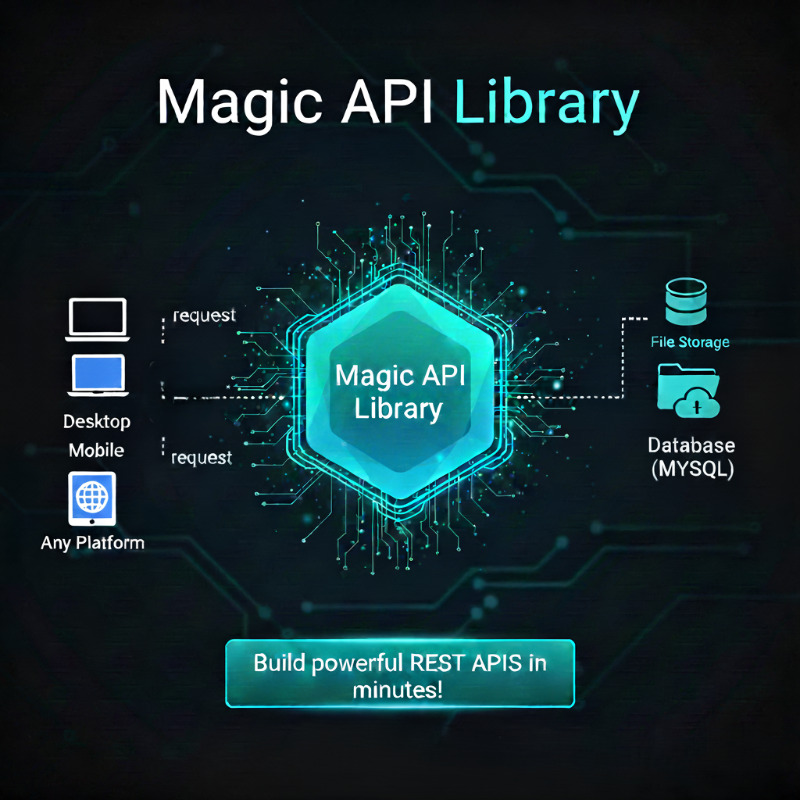
⚡️ Magic API Data Interaction
📱 B4A / B4i App
💻 B4J Desktop
✨ Magic API (api.php)
🗄️ MySQL Database
⚡️ Unleash the API Power
🌟 Greetings, B4X enthusiasts! Today, I'm thrilled to unveil the magic behind our latest creation—the Magic API. Elevate your B4X applications with streamlined API integration, simplifying CRUD operations effortlessly.
🚀 Advantages of Magic API
- ✨ Unlock the Magic: Seamlessly integrate API functionality into your B4X applications.
- ✉️ Effortless CRUD: Create, Read, Update, and Delete with ease, optimizing data management.
- 🔒 Advanced Security: API key authentication, HTTPS encryption, and input validation.
- 💻 User-Friendly Initialization: Just upload
api.php, edit the header with your connection data, and you're ready!
🚀 Usage Instructions
- Upload the
api.phpfile to your server. - Edit the header inside the PHP file with your MySQL connection data.
- Start communicating your app with your mobile and desktop applications.
Note: The API works fine without the library, but the library will help you communicate more easily.
💡 Explore API Endpoints (Manual HTTP)
GET /api.php
Retrieve records from the database:
// Retrieve all records from a table
GET api.php?table=example&api_key=your_api_key

// Retrieve a specific record by ID
GET api.php?table=example&id=1&api_key=your_api_key

// Filter by column and value
GET api.php?table=example&column=age&value=25&api_key=your_api_key

// Use comparison operators (>, <, >=, <=)
GET api.php?table=example&column=age&value=25&comparison=>&api_key=your_api_key
POST /api.php
Create a new record (Send data in JSON format in the Request Body):
POST /api.php?table=example&api_key=your_api_key

{
  "name": "John Doe",
  "age": 30,
  "email": "johndoe@example.com"
}
PUT /api.php
Update existing records:
// Update record by ID
PUT api.php?table=example&id=1&api_key=your_api_key
{ "age": 31 }

// Update by column and value
PUT api.php?table=example&column=name&value=John&api_key=your_api_key
{ "status": "active" }
DELETE /api.php
Delete records from the table:
// Delete by ID
DELETE /api.php?table=example&id=1&api_key=your_api_key

// Delete by column comparison
DELETE /api.php?table=example&column=age&value=18&comparison=<&api_key=your_api_key
📦 MagicApi Library (.b4xlib)
Initialization
Set up the library in your Activity_Create or B4XPage_Created:
magicApi.Initialize(Me, "MyEvents", "http://yourdomain.com", "your_secret_api_key")
Library Methods & Examples
Insertmaps(maps As Map, tablename As String)Dim data As Map
data.Initialize
data.Put("name", "Javier")
data.Put("role", "Engineer")
magicApi.Insertmaps(data, "users")
DeleteByColumn(tablename As String, column As String, value As String)
magicApi.DeleteByColumn("users", "id", "10")
Update(tablename As String, id As String, data As Map)
Dim updateData As Map
updateData.Initialize
updateData.Put("status", "verified")
magicApi.Update("users", "1", updateData)
SearchforId(tablename As String, id As String)
magicApi.SearchforId("users", "1")
Wait For MyEvents_SearchforId(m As Map, success As Boolean)
    If success Then
        Log("User found: " & m.Get("name"))
    End If
GetTable(tablename As String)
magicApi.GetTable("products")
Wait For MyEvents_GetTable(results As List, success As Boolean)
    If success Then
        For Each row As Map In results
            Log(row.Get("product_name"))
        Next
    End If
📱 Full B4X Implementation Code
Example of how your module should look:
Sub Process_Globals
    Private magicApi As MagicApi
End Sub

Sub Globals
    ' UI Elements
End Sub

Sub Activity_Create(FirstTime As Boolean)
    ' Initialize the API communication hub
    magicApi.Initialize(Me, "Magic", "http://example.com", "key_123")

    ' Trigger a test search
    magicApi.SearchforId("customers", "5")
End Sub

' --- Response Events ---

Sub Magic_SearchforId(m As Map, success As Boolean)
    If success Then
        Log("Data Received: " & m)
    Else
        Log("Error accessing API")
    End If
End Sub

Sub Magic_Insertmaps(m As Map, success As Boolean)
    If success Then Log("Record created!")
End Sub

Sub Magic_GetTable(x As List, success As Boolean)
    If success Then
        Log("Table loaded with " & x.Size & " records")
    End If
End Sub

' --- Practical Usage ---

Sub SaveButton_Click
    Dim user As Map = CreateMap("name": "Fernando", "city": "Manta")
    magicApi.Insertmaps(user, "profiles")
End Sub
Thank you for your support. Let the Magic API transform your B4X applications into powerful, connected experiences! 🚀✨