

Overview
JLicenseManager is jdashboardUI's offline licensing module for B4J/Windows. It combines hardware identification, license-code generation and validation, local persistence, Trial mode, expiration, clock-rollback protection, activation UI, themes, and activation callbacks.
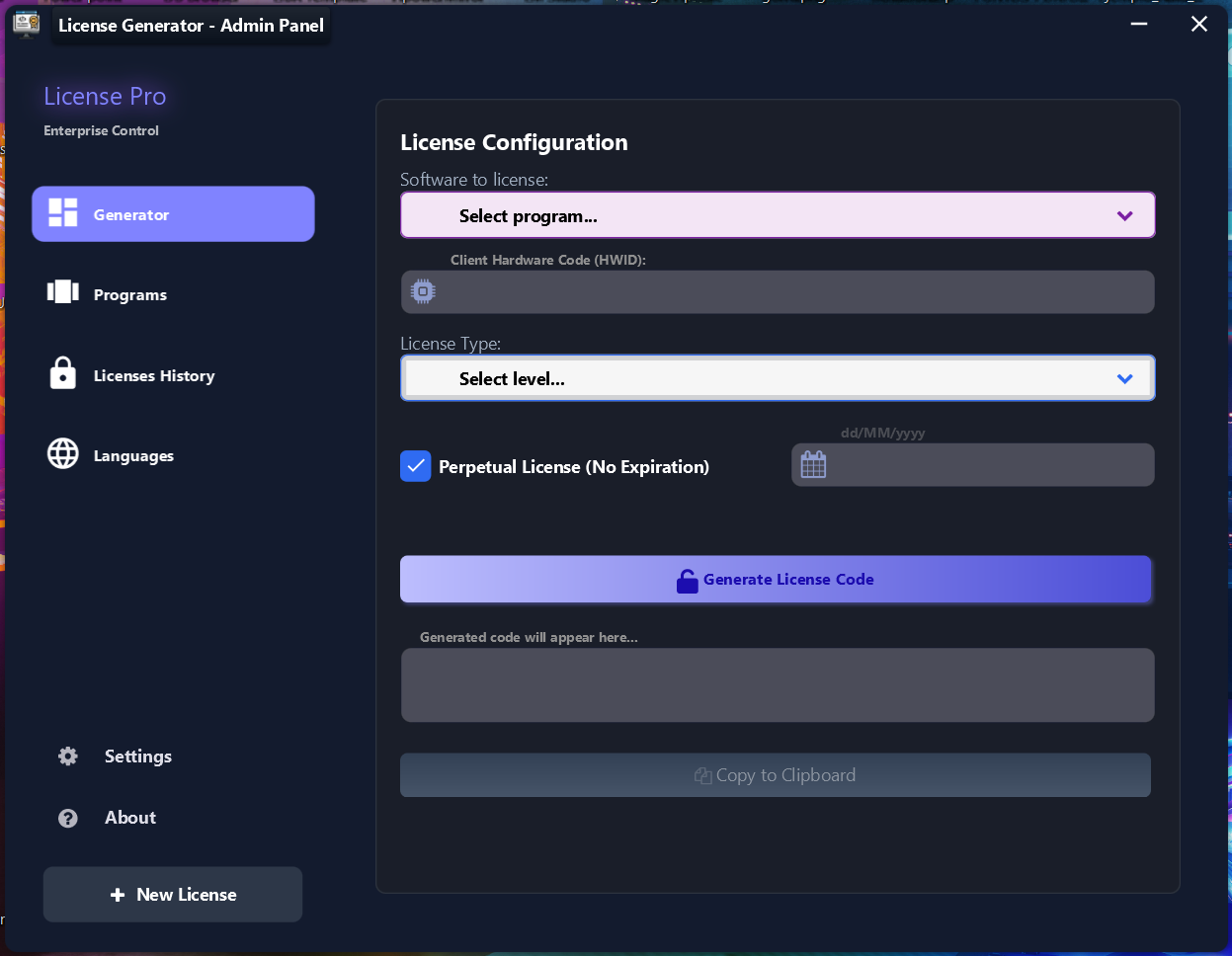
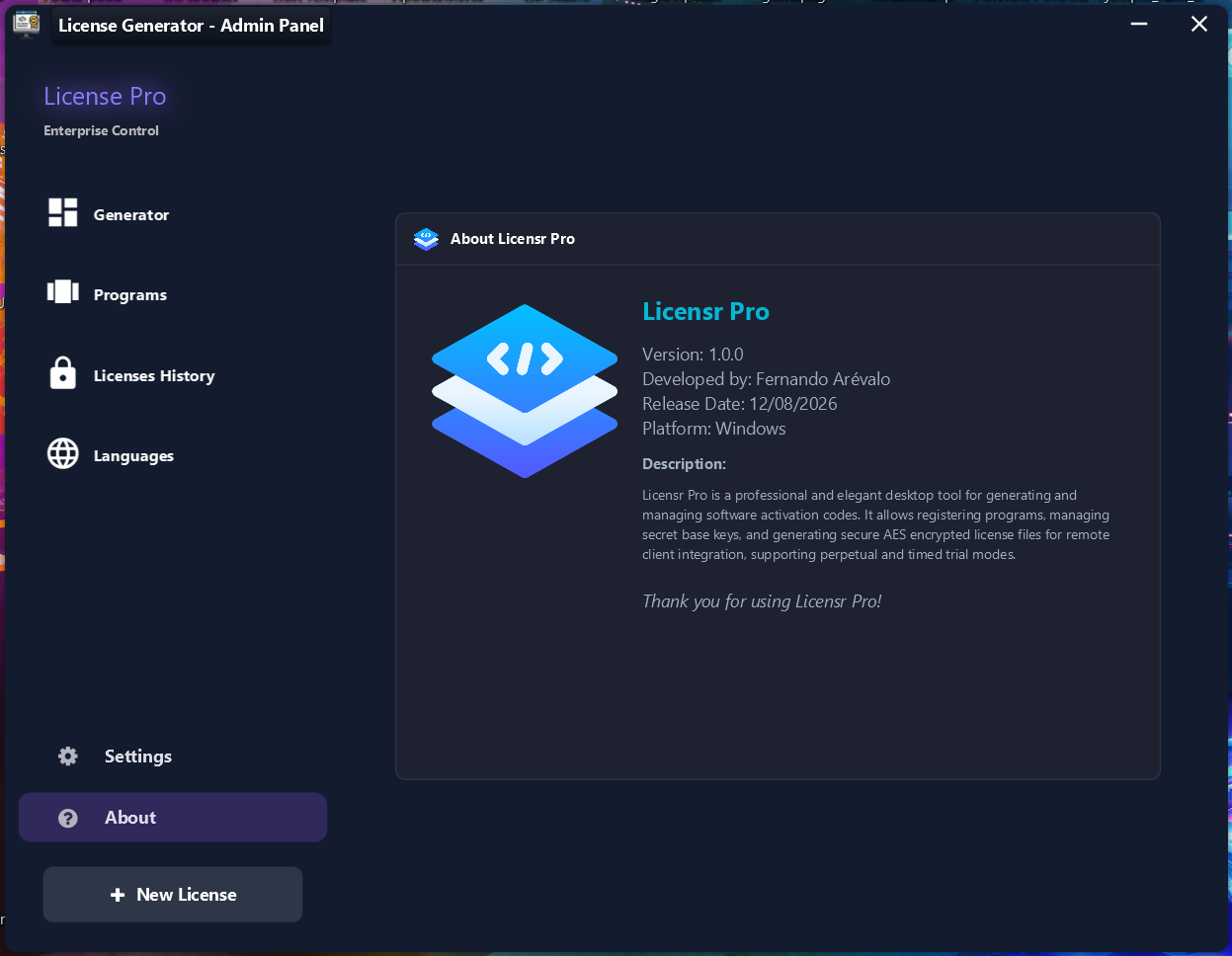
A key part of the distribution is that Licensr Pro uses the same JLicenseManager module used by the client application. Licensr Pro is also built with jdashboardUI and ships with its source code. It therefore serves both as the included license generator/admin tool and as a real reference application made with the library.
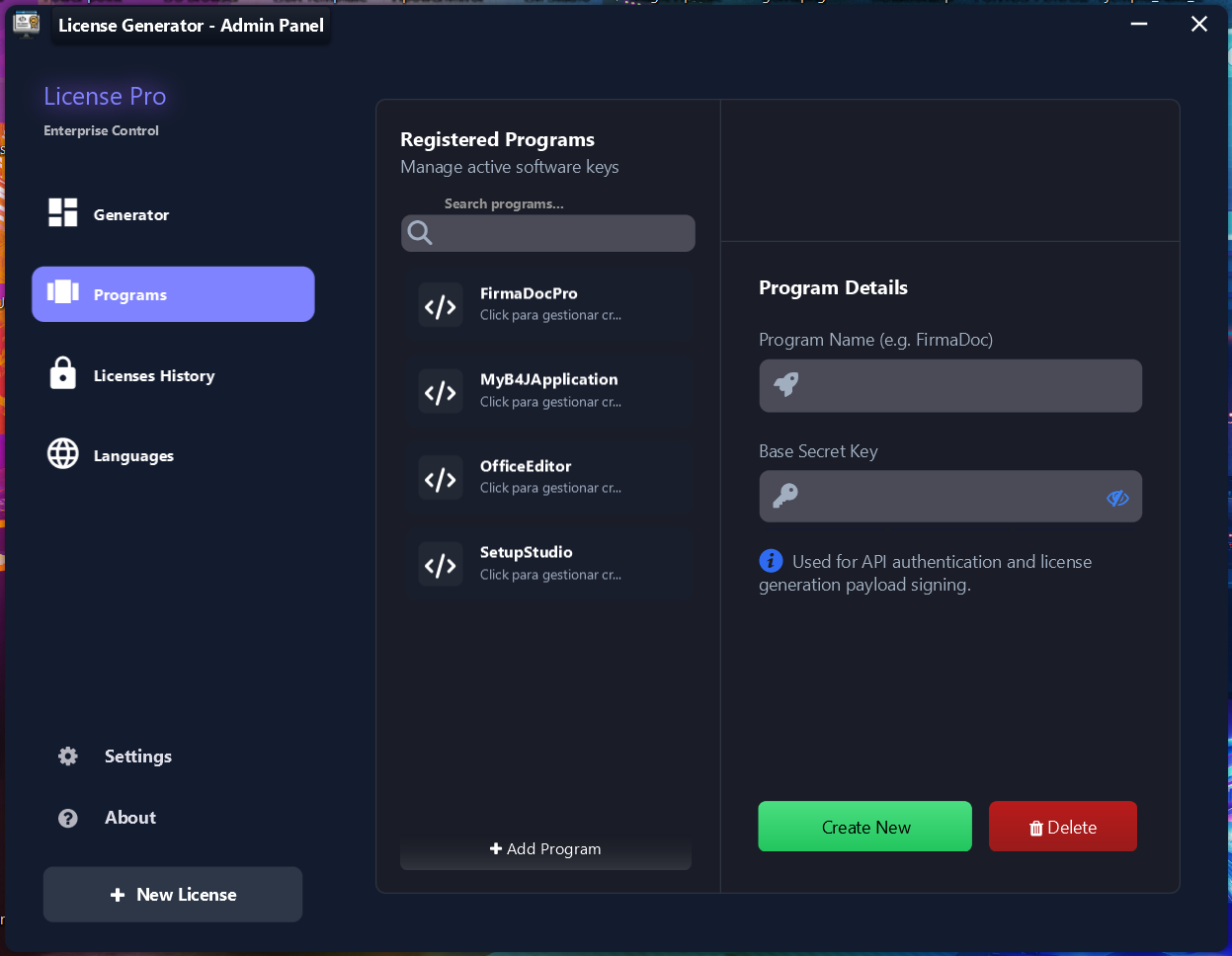
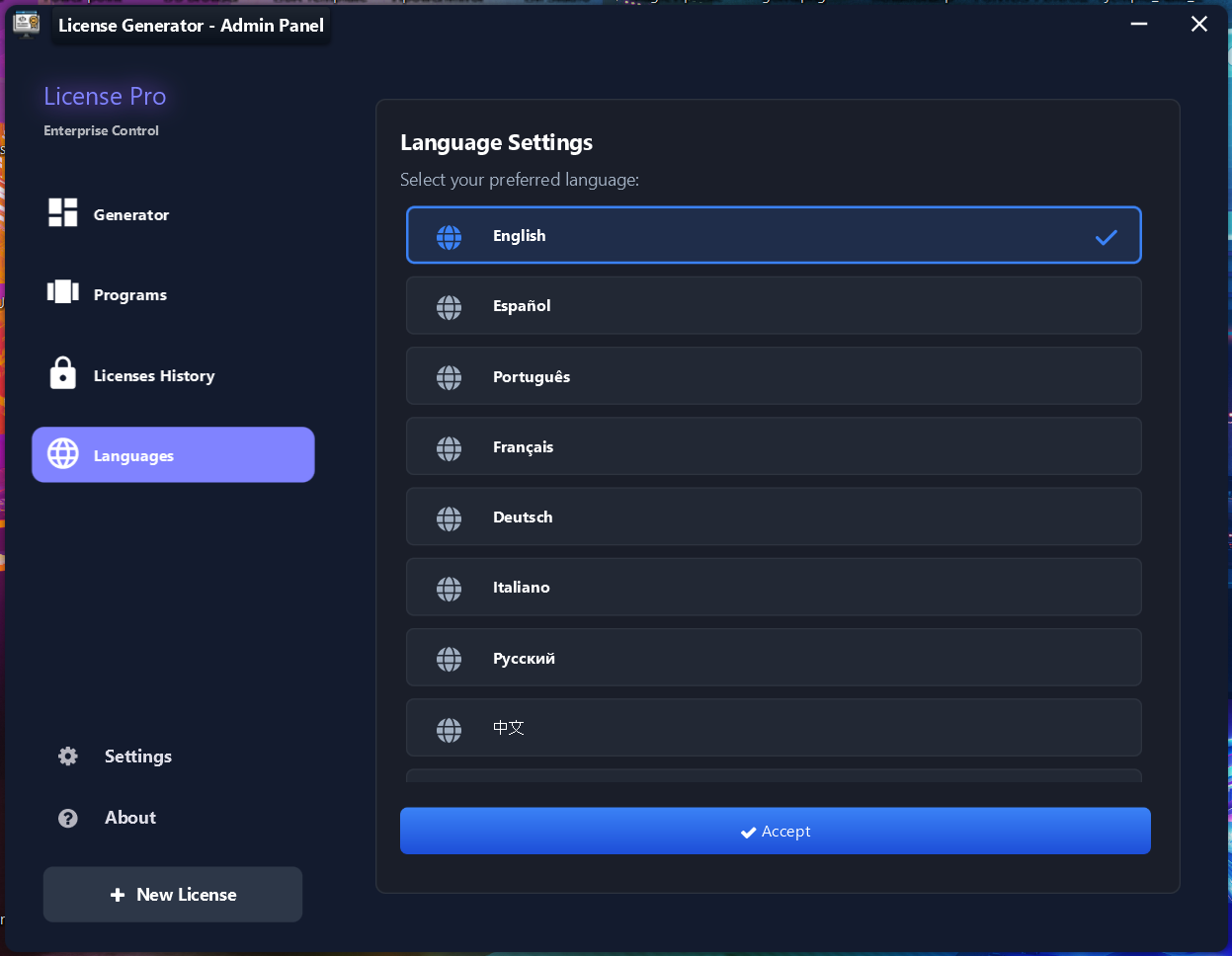
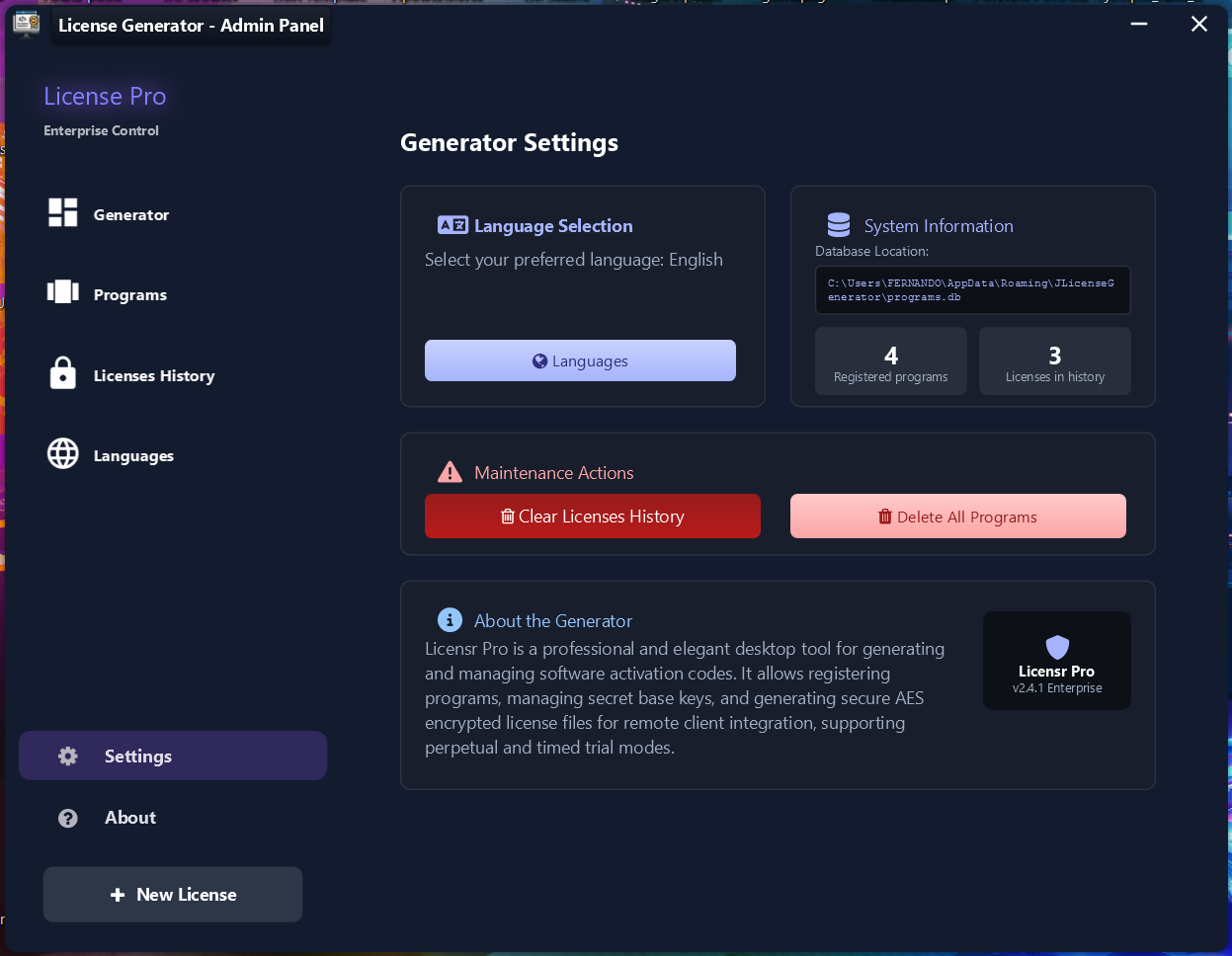
The screenshots on this page are real product screenshots.
Architecture: one module on both sides
There are not two unrelated license engines.
- Client application: JLicenseManager obtains the HWID, loads and validates a local license, shows the activation dialog, supports Trial mode, and can block access when no valid license is available.
- Licensr Pro: the included administrative application manages programs and Base Secret Keys and issues license codes using the same JLicenseManager system.
This shared module is especially useful because developers do not need to reverse-engineer or reproduce the license format in a separate generator. The included Licensr Pro source is the reference implementation for the administrative side.
Platform and dependencies
The current HWID implementation targets Windows. GetHWID reads the baseboard serial number through PowerShell and uses WMIC as fallback.
JLicenseManager uses components and libraries including:
B4XSerializatorB4XCipher/ jB4XEncryptionStringUtilsjShellcustom_formJEditTextjButtonJTextFlowJIconFontCustomMessageBoxCSSUtils
jdashboardUI also includes bcprov-jdk18on-1.85 for the cryptographic infrastructure used by jB4XEncryption.
Initialize
Dim LM As JLicenseManager
LM.Initialize("MY_BASE_SECRET", "MyApplication", Me, "LM")
| Parameter | Type | Purpose |
|---|---|---|
| SecretBase | String | Base secret used by the licensing engine |
| AppName | String | Name used for File.DirData(AppName) |
| Callback | Object | Event receiver |
| EventName | String | Event prefix |
The data directory is created automatically when necessary.
An old source comment mentions
Initialize2, but the current public method is Initialize.
Recommended startup integration
Private LM As JLicenseManager

Sub AppStart (Form1 As Form, Args() As String)
    MainForm = Form1

    LM.Initialize("MY_BASE_SECRET", "MyApplication", Me, "LM")
    LM.Theme = LM.THEME_DARKPRO
    LM.ShowTrialButton = True
    LM.DefaultTrialDays = 7

    Wait For (LM.CheckLicenseAndBlock(MainForm)) Complete (Allowed As Boolean)

    If Allowed = False Then
        ExitApplication
        Return
    End If

    MainForm.Show
End Sub
CheckLicenseAndBlock is the high-level API for a protected application startup.
LicenseResult
Type LicenseResult ( _
    IsValid As Boolean, _
    Message As String, _
    Level As String, _
    ExpirationTicks As Long, _
    ExpirationDate As String)
ExpirationTicks = 0 represents a non-expiring license.
GetHWID
Dim HardwareId As String = LM.GetHWID
The current implementation tries:
- PowerShell
Get-CimInstance -ClassName Win32_BaseBoard. - CMD / WMIC
wmic baseboard get serialnumberas fallback. - The result is cached for the current session.
If neither path succeeds, the module returns HWID_ERROR_O_NO_SOPORTADO.
Because of this implementation, the current HWID mechanism is Windows-specific.
GenerateLicenseCode
Dim Code As String = LM.GenerateLicenseCode( _
    ClientHWID, _
    ExpirationTicks, _
    "Pro")
The serialized payload contains:
hwidexplevelissued
It is serialized, encrypted, and encoded as Base64.
For remote license issuing, use the included Licensr Pro source as the reference administrative implementation, because it already uses the same module and expected workflow.
ValidateLicense
Dim Result As LicenseResult = LM.ValidateLicense(LicenseCode)

If Result.IsValid Then
    Log(Result.Level)
    Log(Result.ExpirationDate)
Else
    Log(Result.Message)
End If
Validation confirms that the code can be decrypted, belongs to the expected HWID, and has not expired. A valid result also updates the module's public license state.
Local license files
SaveLocalLicense
LM.SaveLocalLicense(LicenseCode)
The module stores:
license.lic— the license codesys_time.dat— encrypted clock-control data
Both are stored under File.DirData(AppName).
LoadLocalLicense
Dim Result As LicenseResult = LM.LoadLocalLicense
This checks clock tampering and then validates the stored license.
Clock rollback protection
The module stores the last known time in encrypted sys_time.dat.
If the current clock is more than one hour earlier than the stored time, the local license is treated as blocked due to clock tampering.
If the time file itself cannot be decrypted, the current implementation recreates it using the current time instead of automatically blocking access.
This is local protection; it is not a replacement for server-side revocation when an online licensing model is required.
Trial mode
LM.StartTrialMode(7)
A Trial is created only when license.lic does not already exist. Internally it generates a license whose level is Trial and saves it locally.
For the activation dialog:
LM.ShowTrialButton = True
LM.DefaultTrialDays = 7
Activation dialog
Dim Result As LicenseResult = LM.ShowActivationDialog(MainForm)
The real screenshot above shows this client-side UI. It includes:
- license status
- read-only HWID
- copy-HWID action
- activation-code field
- Activate / Update License
- optional Trial
- Cancel
- configurable theme
- visual alerts
The dialog itself is built with jdashboardUI components such as JEditText, jButton, JTextFlow, CustomMessageBox, and custom_form.
Events
Private Sub LM_ActivationSuccess(Result As LicenseResult)
End Sub

Private Sub LM_ActivationFailed(Message As String)
End Sub

Private Sub LM_TrialActivated(Result As LicenseResult)
End Sub

Private Sub LM_ActivationCancelled
End Sub
Confirmed current behavior:
ActivationSuccessis raised after a valid code is saved.ActivationFailedis raised for an invalid entered code.TrialActivatedis raised after a successful Trial activation.ActivationCancelledis declared, but the current Cancel/close handlers only close the form and do not raise that callback. Do not depend on it until that implementation is changed.
Public license state
After loading or validating a license:
Log(LM.LicenseIsValid)
Log(LM.LicenseLevel)
Log(LM.LicenseExpirationTicks)
Log(LM.LicenseExpirationDate)
Log(LM.LicenseMessage)
Expiration warning
LM.WarningDaysBeforeExpiration = 5
CheckLicenseAndBlock can warn when a valid license is close to expiration while still allowing the program to continue.
Themes
Default theme: DarkPro.
LM.Theme = LM.THEME_OCEAN
LM.ApplyTheme(LM.Theme)
Available themes:
DarkPro, NordicFrost, ForestGreen, MidnightBlue, MaterialIndigo, VampireRed, Cyberpunk, SlateGray, DeepPurple, CoffeeBeans, Ocean, Sunset, Ice, DarkElegant, LightPro, RoseGold, SageGreen, TealMinimalist, WarmCopper, CyberOrange, Lavender, SoftBlue.
Dialog localization
The important dialog strings are public and can be replaced, including:
DialogTitle, DialogStatusExpired, DialogStatusInvalid, DialogStatusActive, DialogHWIDLabel, DialogLicenseLabel, DialogCopyButton, DialogActivateButton, DialogUpdateButton, DialogCancelButton, DialogTrialButton, success/error/warning strings, Trial strings, block strings, and expiration-warning strings.
Example:
LM.DialogTitle = "Product activation"
LM.DialogHWIDLabel = "Hardware code"
LM.DialogActivateButton = "Activate"
LM.DialogTrialButton = "Try free"
LM.DialogCancelButton = "Cancel"
Placeholders:
{EXP}{LEVEL}{DAYS}
Date format
LM.ExpirationDateFormat = "dd/MM/yyyy"
Log(LM.FormatDate(DateTime.Now))
For ticks <= 0, FormatDate returns Never.
AlwaysOnTop
LM.AlwaysOnTop = True
This is applied to forms and alerts created by the module.
CheckLicenseAndBlock flow
CheckLicenseAndBlock(Parent):
- Applies the configured theme.
- Runs
LoadLocalLicense. - Warns if a valid license is close to expiration.
- If needed, opens
ShowActivationDialog. - Returns
Trueafter successful activation. - Otherwise shows Access Denied and returns
False.
Licensr Pro: included source generator
The library distribution includes Licensr Pro and its source code.
This matters for three reasons:
- Same JLicenseManager: client and generator use the same licensing module.
- Built with jdashboardUI: Licensr Pro is a real full desktop application demonstrating the library itself.
- Customizable source: developers can adapt language, workflow, license levels, UI, and program administration.
Licensr Pro includes these main areas:
Generator
Select a program, enter the client HWID, select the license level, choose perpetual or expiration-date mode, generate the license code, and copy it.
Programs
Manage registered programs and each program's Base Secret Key.
Languages
Multilingual generator interface.
Settings
System information, database location, statistics, language selection, and maintenance actions.
About
Generator information and product details.
Recommended end-to-end workflow
Client
LM.Initialize("MY_BASE_SECRET", "MyApplication", Me, "LM")
LM.Theme = LM.THEME_DARKPRO

Wait For (LM.CheckLicenseAndBlock(MainForm)) Complete (Allowed As Boolean)
If Allowed = False Then ExitApplication
Issuing a license with Licensr Pro
- Register the program in Licensr Pro.
- Configure the matching Base Secret Key.
- Get the HWID displayed by the client.
- Select the license level and expiration.
- Generate the code.
- Send the code to the user.
- The user enters it in the JLicenseManager dialog.
- JLicenseManager validates and stores the local license.
Complete public API
| Method | Return | Purpose |
|---|---|---|
| Initialize(SecretBase, AppName, Callback, EventName) | - | Initialize |
| SetCallback(Callback, EventName) | - | Replace event receiver |
| GetHWID | String | Get hardware ID |
| StartTrialMode(Days) | - | Start Trial if no local license exists |
| SaveLocalLicense(LicenseCode) | - | Store license and clock-control data |
| LoadLocalLicense | LicenseResult | Load and validate |
| GenerateLicenseCode(HWID, ExpirationTicks, MyLicenseLevel) | String | Generate code |
| ValidateLicense(LicenseCode) | LicenseResult | Validate code |
| ApplyTheme(ThemeName) | - | Apply activation theme |
| ShowActivationDialog(Parent) | LicenseResult | Show modal activation UI |
| FormatDate(ticks) | String | Format expiration |
| CheckLicenseAndBlock(Parent) | ResumableSub | Complete protected-startup flow |
Limitations and security considerations
- Current HWID retrieval is Windows-specific.
- A motherboard change can alter the hardware identifier.
- Offline security depends on protecting the Base Secret Key.
- Offline licensing cannot provide instant server-side revocation by itself.
- Clock protection is local and uses a one-hour rollback tolerance.
- For remote license issuing, use the included Licensr Pro source as the administrative reference.