
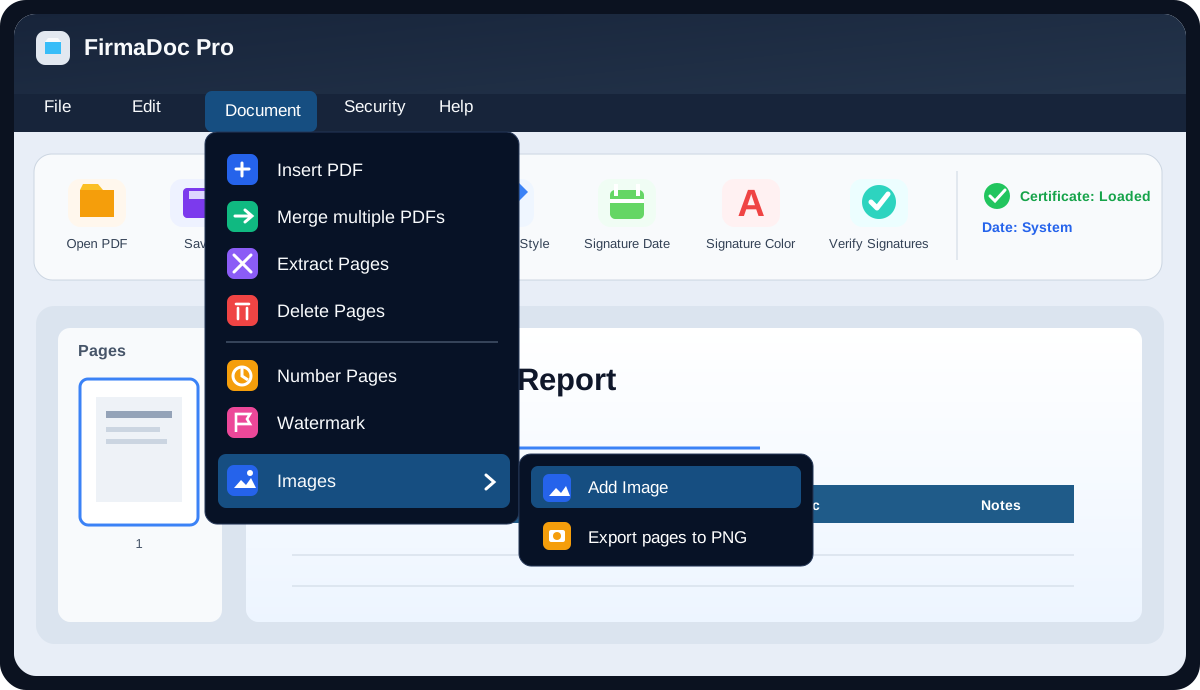
What JMenuBar is
JMenuBar is the jdashboardUI top menu bar for B4J applications. It is used to create menus such as File, Edit, Document, Security or Help, with commands, separators and cascading submenus.
The simplest mental model is:
- JMenuBar renders the bar and opens menus.
- JMenuTab represents a top-level menu such as
File. - jMenuItem represents an action such as
Open PDF. - JSubMenu represents a nested menu such as
Images > Add image.
You do not need to create the floating panels manually. JMenuBar builds and positions them internally.
Dependencies
For normal use, think in terms of four pieces. You do not need to learn every internal module.
| Piece | Represents | Example |
|---|---|---|
JMenuBar |
The complete menu bar | File · Edit · Document |
JMenuTab |
One top-level menu | Document |
jMenuItem |
One command | Insert PDF |
JSubMenu |
A menu inside another menu | Images > Add image |
Mental model
JMenuBar
├── JMenuTab "File"
│   ├── jMenuItem "Open PDF"
│   ├── jMenuItem "Save"
│   └── jMenuItem "Close application"
│
└── JMenuTab "Document"
    ├── jMenuItem "Insert PDF"
    ├── jMenuItem "Merge multiple PDFs"
    └── JSubMenu "Images"
        ├── jMenuItem "Add image"
        └── jMenuItem "Export pages to PNG"
That is the same kind of structure used by an application such as FirmaDoc Pro: the top bar contains menus and each option maps to a B4J event.
What JMenuBar uses internally
The current source confirms that JMenuBar mainly relies on:
jFloatingPanel: creates the floating dropdown surface.CustomListView: visually hosts the menu rows.jdProperties: stores themes and persistent enabled states.jdashboardUtils: creation and styling helpers.JImageView: image support for tabs, items and submenus.janimations: visual feedback.JTextFlow: text composition.CSSUtils,JavaObjectandReflector: JavaFX styling, tooltips and keyboard integration.
All of that is internal. Application code normally works with JMenuBar, JMenuTab, jMenuItem and JSubMenu.
JFluentMenu and JWindowsMenuStyle are other menu systems included in jdashboardUI, but they are not required dependencies of JMenuBar.
Recommended implementation
- Add
JMenuBarin the Designer. - Create a
JMenuTab. - Create one or more
jMenuItemobjects. - Add the items to the tab.
- Add the tab with
AddMenuTab. - Implement one
EventName_ClickSub for each command.
JMenuBar currently does not expose a public AddToParent, so the straightforward supported integration is as a Custom View from the Designer.
Minimal example
Assume the Designer Custom View is named MenuBar1.
Private Sub CreateMenus
    Dim tabFile As JMenuTab
    tabFile.Initialize("File")

    Dim itemOpen As jMenuItem
    itemOpen.Initialize( _
        "OpenPDF", _
        "Open PDF", _
        Chr(0xE2C7), _
        xui.CreateMaterialIcons(20), _
        0xFFFFB300, _
        "Open a PDF file")

    tabFile.AddItem(itemOpen)

    MenuBar1.AddMenuTab(tabFile)
End Sub
The first item parameter is its event name:
"OpenPDF"
That maps to:
Private Sub OpenPDF_Click
    Log("Open PDF")
End Sub
JMenuBar resolves EventName_Click automatically.
Cascading submenu
Private Sub CreateDocumentMenu
    Dim tabDocument As JMenuTab
    tabDocument.Initialize("Document")

    Dim subImages As JSubMenu
    subImages.Initialize("SubImages", "Images", Chr(0xE3F4), _
        xui.CreateMaterialIcons(20), 0xFF2F80ED)

    Dim addImage As jMenuItem
    addImage.Initialize("AddImage", "Add Image", Chr(0xE3F4), _
        xui.CreateMaterialIcons(20), 0xFF2F80ED, "Insert an image")

    Dim exportPng As jMenuItem
    exportPng.Initialize("ExportPNG", "Export pages to PNG", Chr(0xE3AF), _
        xui.CreateMaterialIcons(20), 0xFFF5A623, "Export as PNG")

    subImages.AddItem(addImage)
    subImages.AddItem(exportPng)

    tabDocument.AddSubMenu(subImages)
    MenuBar1.AddMenuTab(tabDocument)
End Sub
Events remain normal B4J Subs:
Private Sub AddImage_Click
End Sub

Private Sub ExportPNG_Click
End Sub
JMenuTab
Text only:
Dim tab As JMenuTab
tab.Initialize("File")
With icon:
tab.InitializeGraphic("File", Chr(0xE2C7), _
    xui.CreateMaterialIcons(18), xui.Color_White)
With image:
tab.InitializeImage("File", File.DirAssets, "file.png")
Resources:
tab.AddItem(myItem)
tab.AddSubMenu(mySubMenu)
tab.AddSeparator(xui.Color_Gray)
Automatic theme selector:
tab.AddThemeSelector("Themes", Chr(0xE439), _
    xui.CreateMaterialIcons(18), xui.Color_Cyan)
jMenuItem
With icon:
Dim item As jMenuItem
item.Initialize("Save", "Save", Chr(0xE161), _
    xui.CreateMaterialIcons(20), xui.Color_Green, "Save file")
With image:
item.InitializeImage("Save", "Save", _
    File.DirAssets, "save.png", "Save file")
Useful properties:
item.Text = "Save as..."
item.Enabled = True
item.Visible = True
item.Shortcut = "Ctrl+Shift+S"
item.Tooltip = "Save with another name"
item.Value = 100
Keyboard shortcuts
itemOpen.Shortcut = "Ctrl+O"
itemSave.Shortcut = "Ctrl+S"
The same EventName_Click handler is called when the shortcut is pressed.
Supported modifier names include Ctrl, Shift and Alt.
Enable and disable commands
Before adding an item:
itemSave.Enabled = False
After the menu has been built:
MenuBar1.SetItemEnabled("SavePDF", False)
MenuBar1.SetItemEnabled("SavePDF", True)
Items are located by EventName, which is useful for multilingual applications because it does not depend on the visible translated text.
Persistent states
MenuBar1.SetTabEnabledPersistent(tabFile, False)
MenuBar1.SetTabItemEnabledPersistent(tabFile, "SavePDF", False)
MenuBar1.SetSubMenuItemEnabledPersistent(subImages, "ExportPNG", False)
MenuBar1.RestoreStates
Persistence is handled internally through jdProperties and KeyValueStore.
Trigger an item from code
MenuBar1.TriggerItemClick("SavePDF")
This invokes the same SavePDF_Click Sub.
Themes
MenuBar1.Theme = MenuBar1.THEME_MIDNIGHT_BLUE
MenuBar1.ApplyPredefinedTheme(MenuBar1.THEME_DARK_PRO)
Available themes include DarkPro, LightClean, MidnightBlue, ForestGreen, DeepPurple, VampireRed, Cyberpunk, CoffeeBeans, SweetPink, WarmCream, AgedParchment, OceanBreeze, CyberOrange, NeonLime, LavenderDream, SolarFlare, MintyFresh, RoyalGold, DesertSand, CarbonRed and Glass.
To keep Designer colors and block theme changes:
MenuBar1.LockCustomColors = True
Main Designer properties
| Property | Purpose |
|---|---|
MenuBarBackgroundColor |
Top bar background |
MenuBackgroundColor |
Dropdown background |
MenuBarActiveColor |
Active / hover color |
MenuBarTextColor |
Tab text |
MenuTextColor |
Item text |
TextSize |
Text size |
Theme |
Predefined theme |
LockCustomColors |
Blocks theme color changes |
MenuBarHeight |
Bar height |
CornerRadius |
Bar corner radius |
BoldBarText |
Bold tab text |
BoldMenuText |
Bold dropdown text |
SeparatorDefaultColor |
Separator color |
MenuItemHeight |
Menu item height |
Most useful public API
| Method / property | Purpose |
|---|---|
AddMenuTab |
Adds a complete JMenuTab |
Clear |
Clears the bar |
SetMenuFont |
Changes menu font |
SetMenuEnabled |
Enables or disables a menu |
SetItemEnabled |
Enables an item by EventName |
SetItemEnabledPersistent |
Same, with persisted state |
TriggerItemClick |
Executes an item from code |
ApplyPredefinedTheme |
Applies a theme |
CreateThemeSelector |
Creates an automatic theme selector |
RestoreStates |
Restores persisted states |
Theme |
Current theme |
CurrentTheme |
Active theme name |
ImageSize |
Image icon size |
Quick pattern
Dim tab As JMenuTab
tab.Initialize("File")

Dim item As jMenuItem
item.Initialize("MyEvent", "My option", Chr(0xE8B6), _
    xui.CreateMaterialIcons(20), xui.Color_White, "Description")

tab.AddItem(item)
MenuBar1.AddMenuTab(tab)
and:
Private Sub MyEvent_Click
    ' Your code
End Sub
That is enough to build a working menu.
Current limitations worth knowing
These notes come from the current jdashboardUI source and avoid documenting capabilities that are not fully implemented:
MenuItemHeightis public and participates in internal layout calculations, but several current rendering paths still use35dip. Test non-default values visually before depending on them.jMenuItem.TextColorstores a color, while the current renderer mainly uses the globalMenuTextColor.jMenuItem.Valuestores an object, butEventName_Clickreceives no parameters.JSubMenuacceptsjMenuItemobjects and separators. The current public API does not expose anotherAddSubMenu, so it should not be documented as an unlimited recursive menu tree.- The current JMenuBar API has no direct equivalent of native B4J
CheckMenuItem.
Final comparison: jdashboardUI JMenuBar vs native B4J MenuBar
B4J already includes a native MenuBar in the jFX library. The official B4J reference says that a MenuBar contains Menu objects, and a Menu can contain MenuItem objects as well as other Menu objects. jFX also includes CheckMenuItem, with a Selected state and SelectedChange event.
The simplest difference is: the native MenuBar is the standard JavaFX control; JMenuBar is a higher-level visual menu system designed for jdashboardUI.
| Feature | Native B4J / jFX MenuBar | jdashboardUI JMenuBar |
|---|---|---|
| Base | Standard JavaFX control exposed by jFX |
jdashboardUI Custom View built on JavaFX |
| Structure | Menu + MenuItem + CheckMenuItem |
JMenuTab + jMenuItem + JSubMenu |
| Building menus | Code or Designer menus declared as JSON | B4X objects plus AddMenuTab |
| Events | Action; SelectedChange for CheckMenuItem |
One Sub per command: EventName_Click |
| Icons | MenuItem.Image; the official reference says images are typically 16×16 |
MaterialIcons / FontAwesome with per-icon color, or images |
| Submenus | A Menu can contain other Menu objects, allowing deep native nesting |
JSubMenu provides the cascading level shown by FirmaDoc Pro; the current API does not expose recursive submenus |
| Shortcuts | B4J Designer menu JSON supports Shortcut; accelerators created fully in code can use JavaFX |
item.Shortcut = "Ctrl+S" directly, with integrated Ctrl / Shift / Alt handling |
| Themes | JavaFX/CSS | 20+ themes, colors, radius, bold text and automatic theme selector |
| Persistence | Application-managed | Built in through jdProperties for themes and enabled states |
| Checkable items | Yes, with CheckMenuItem |
Not in the current API |
| Enable/disable by stable identifier | Usually by keeping references or Tag |
SetItemEnabled("Event", False) |
| Trigger from code | Call your command logic or keep a reference | TriggerItemClick("Event") |
| Best fit | Standard menus, checkable items or deep native menu trees | Visual apps already using jdashboardUI and wanting consistent styling |
The current API changed from the Internet Sneak Peek
The JMenuBar Sneak Peek published on the B4X forum on March 16, 2026 showed methods such as:
AddMenu
AddMenu2
AddSubMenu
AddMenuItem
AddSeparator
That was the preliminary API for that build. In the current source, those low-level routines are internal/private. The recommended public pattern is now:
JMenuTab
   ├── jMenuItem
   └── JSubMenu
          └── jMenuItem

          ↓

JMenuBar.AddMenuTab(...)
That is why this documentation uses JMenuTab, jMenuItem, JSubMenu and AddMenuTab: it matches the version currently distributed.
Equivalent native MenuBar example
A native MenuItem can use its own EventName:
Dim FileMenu As Menu
FileMenu.Initialize("File", "")

Dim OpenItem As MenuItem
OpenItem.Initialize("Open PDF", "OpenPDF")
FileMenu.MenuItems.Add(OpenItem)

MenuBar1.Menus.Add(FileMenu)

Private Sub OpenPDF_Action
    Log("Open PDF")
End Sub
With JMenuBar the concept is similar, but the event ends in _Click, and the item can carry icon, color, tooltip and shortcut in the same system:
Dim OpenItem As jMenuItem
OpenItem.Initialize("OpenPDF", "Open PDF", Chr(0xE2C7), _
    xui.CreateMaterialIcons(20), 0xFFFFB300, "Open file")
OpenItem.Shortcut = "Ctrl+O"

Private Sub OpenPDF_Click
    Log("Open PDF")
End Sub
Practical conclusion
For an interface such as FirmaDoc Pro, where colored icons, disabled commands, separators, a cascading Images submenu, themes and persistent states are already part of the design, JMenuBar fits the rest of jdashboardUI better.
If an application only needs a standard JavaFX menu, requires CheckMenuItem, or needs many nested menu levels, the native B4J MenuBar is more direct. It is not obsolete or inferior; it is the standard JavaFX menu control.
External references reviewed
- Official B4J jFX reference (
Menu,MenuBar,MenuItem,CheckMenuItem):https://www.b4x.com/b4j/help/jfx.html - Erel tutorial on Designer menus (JSON, EventName, Tag, Shortcut, etc.):
https://www.b4x.com/android/forum/threads/designer-menu-items.56602/ - Original JMenuBar Sneak Peek:
https://www.b4x.com/android/forum/threads/%F0%9F%9A%80-sneak-peek-jmenubar-is-coming-to-jdashboardui.170603/