
Tables & Data · jdashboardUI · B4J / JavaFX
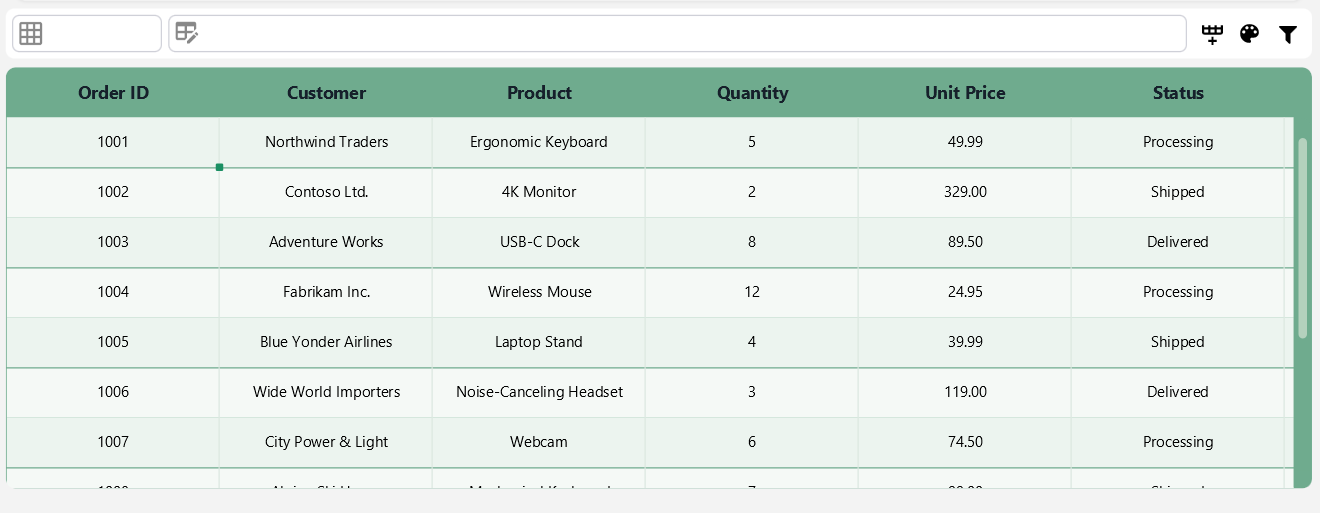
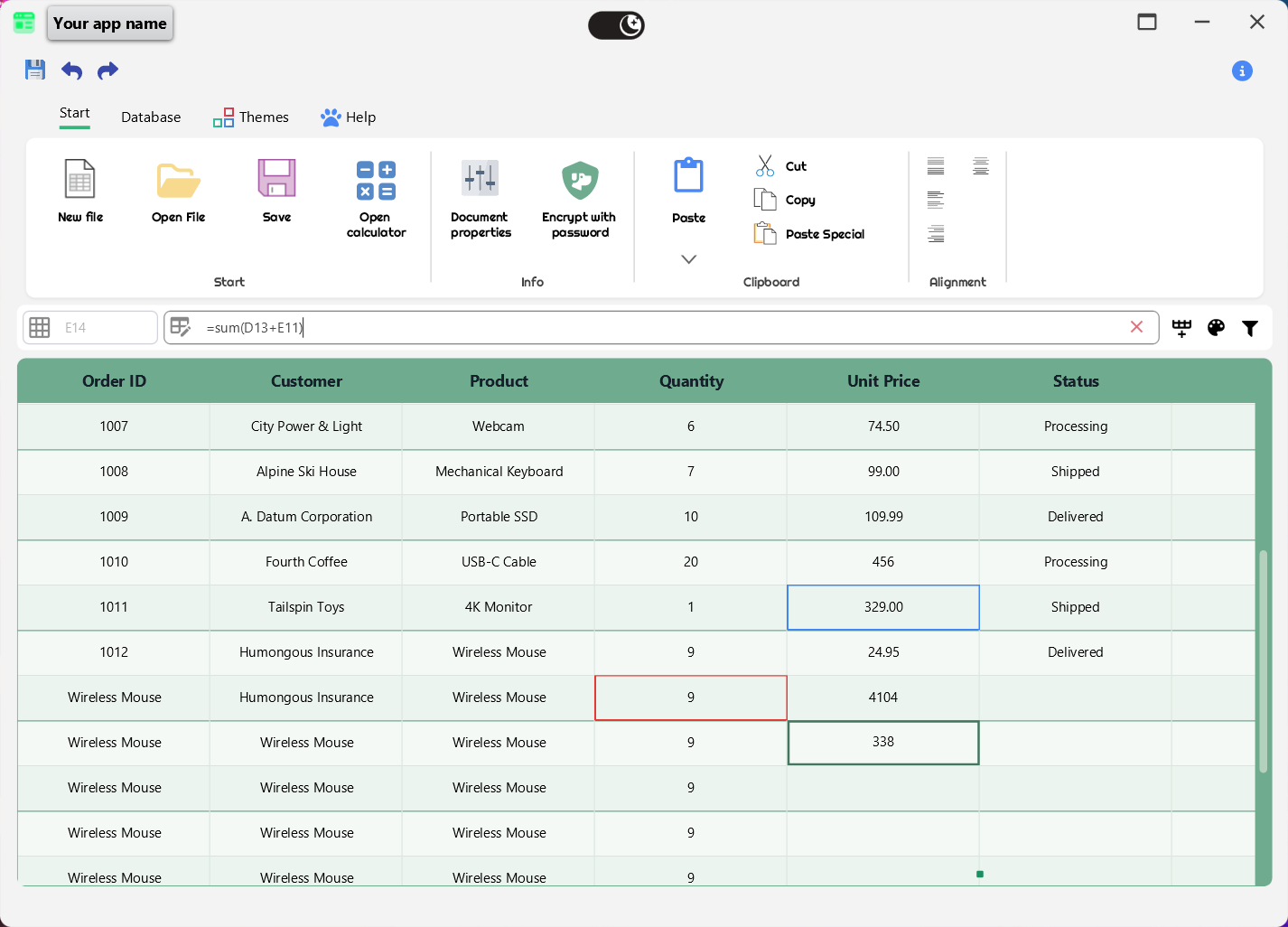
JTableview is an advanced visual table for B4J. It combines cell editing, column types, spreadsheet-style formulas, filters, search, keyboard navigation, themes, multilingual UI, rich cell controls and SQLite utilities.
Highlights
- A1 formulas such as
=A1+B1,=B2*C2and=SUM(A1:A10). - Custom formula functions through
SetFormulaFunction. - Fill handle that copies formulas while adjusting relative references.
- Multilingual UI with
Autoplus many explicit locale codes. - 29 visual themes in the analyzed version.
- Accumulated filters and built-in search UI.
- Excel-like keyboard navigation.
- Editable cells and change events.
- Column types for text, numbers, dates, time, percentages, currency and images.
- Rich cell content with buttons, checkboxes, switches, images and icons.
- SQLite loading, updating and delete helpers.
- Fixed or automatic row height.
Designer usage
JTableview is a Custom View.
Sub Class_Globals
    Private Root As B4XView
    Private xui As XUI
    Private JTableview1 As JTableview
End Sub

Private Sub B4XPage_Created (Root1 As B4XView)
    Root = Root1
    Root.LoadLayout("Main")
End Sub
Designer Properties
| Property | Type | Default | Purpose |
|---|---|---|---|
| TextColor | Color | 0xFF595959 |
Cell text color |
| EditMode | Boolean | True |
Enables editing / formula bar |
| EditThemeIcon | Boolean | True |
Enables theme control in the component |
| FilterEnabled | Boolean | False |
Enables filter UI |
| Language | String | Auto |
Internal component language |
| Showmenu | Boolean | True |
Context menu |
| CornerRadius | Int | 7 |
Corner radius |
| TableViewTheme | String | Purple |
Visual theme |
| BackgroundColor | Color | 0xFFFFFFFF |
Toolbar background |
DesignerCreateView is public because of the B4X Custom View contract, but it is normally called by the framework.
Initialize
JTableview1.Initialize(Me, "JTableview1")
The analyzed version does not expose a public AddToParent method.
B4X properties
Property-compatible lowercase getX/setX accessors are used with standard B4X property syntax:
JTableview1.Language = "en"
JTableview1.FilterEnabled = True
JTableview1.Currency = "$"
JTableview1.ExcelKeyboardNavigation = True
JTableview1.SelectedRow = 2

Log(JTableview1.Language)
Log(JTableview1.SelectedRow)
Log(JTableview1.ColumnsCount)
Public properties include:
| Property | Access | Type |
|---|---|---|
| TextTVEmpty | write | String |
| Language | read / write | String |
| CurrentTableColor | read | Int |
| Corner | write | Int |
| FilterEnabled | read / write | Boolean |
| BarBackgroundColor | write | Int |
| TableSingleCellSelection | write | Boolean |
| Currency | read / write | String |
| ExcelKeyboardNavigation | read / write | Boolean |
| AllColumnTableWidth | write | Float |
| ColumnsCount | read | Int |
| SelectedRow | read / write | Int |
| CellTextColor | write | Int |
| CellFont | write | Font |
Methods such as getColumnWidth(Index), getRowHeight(Index) and setColumnWidth(Index, Width) remain methods because they require an additional index parameter.
Complete example: inventory with formulas
Sub Class_Globals
    Private Root As B4XView
    Private xui As XUI
    Private JTableview1 As JTableview
End Sub

Private Sub B4XPage_Created (Root1 As B4XView)
    Root = Root1
    Root.LoadLayout("Main")

    Dim Columns As List
    Columns.Initialize
    Columns.AddAll(Array As String("Product", "Price", "Stock", "Total"))
    JTableview1.Setcolumns(Columns)

    JTableview1.Language = "en"
    JTableview1.Currency = "$"
    JTableview1.ThemeBlue

    JTableview1.SetColumnTypeByname("Price", JTableview1.COLUMN_TYPE_CURRENCY)
    JTableview1.SetColumnTypeByname("Stock", JTableview1.COLUMN_TYPE_NUMBERS)
    JTableview1.SetColumnTypeByname("Total", JTableview1.COLUMN_TYPE_CURRENCY)

    JTableview1.add(Array As Object( _
        JTableview1.CreateLabel("Keyboard", "Product"), _
        JTableview1.CreateLabel("29.95", "Price"), _
        JTableview1.CreateLabel("12", "Stock"), _
        JTableview1.CreateLabel("0", "Calculated")))

    JTableview1.add(Array As Object( _
        JTableview1.CreateLabel("Mouse", "Product"), _
        JTableview1.CreateLabel("14.50", "Price"), _
        JTableview1.CreateLabel("25", "Stock"), _
        JTableview1.CreateLabel("0", "Calculated")))

    JTableview1.SetFormula(3, 0, "=B1*C1")
    JTableview1.SetFormula(3, 1, "=B2*C2")
    JTableview1.FormatAllRows
End Sub
There is no public AddRow method in this version. Use add, addAtll or addAtll2.
Formulas
JTableview1.SetFormula(2, 0, "=A1+B1")
Dim Formula As String = JTableview1.GetFormula(2, 0)
Built-in functions found in the source:
SUM/SUMAAVERAGE/PROMEDIOMIN/MINIMOMAX/MAXIMOCOUNT/CONTARABSIF/SIPOWER/POTENCIASQRT/RAIZROUND/REDONDEARROUNDUPROUNDDOWNMOD/RESIDUO
Ranges, parentheses, arithmetic operators and comparisons are supported.
Custom function
Dim Parameters As List
Parameters.Initialize
Parameters.Add("value")

JTableview1.SetFormulaFunction("DOUBLE", Parameters, "value*2")
JTableview1.SetFormula(2, 0, "=DOUBLE(A1)")
Remove it with:
JTableview1.RemoveFormulaFunction("DOUBLE")
Fill handle
With EditMode enabled, JTableview exposes a fill handle. Literal values are copied and formulas are translated using relative references.
Multilingual UI
JTableview1.Language = "Auto"
Auto follows the system language.
You can force a locale:
JTableview1.Language = "en"
JTableview1.Language = "es"
JTableview1.Language = "fr"
Designer locale options include ar, bn, cs, de, en, es, fa, fr, he, hi, it, ja, ko, my, nl, pa, pl, pt, ro, ru, sr, th, tr, uk, vi and zh.
Themes
Use a theme method directly:
JTableview1.ThemePurple
JTableview1.ThemeBlue
JTableview1.ThemeGreen
JTableview1.ThemeWhite
Public theme methods:
ThemePurple, ThemeGreen, ThemeBlue, ThemeBrown, ThemeSkyBlue, ThemeYellow, ThemeRed, ThemeBlack, ThemeOrange, ThemePurple2, ThemeSkyBlue2, ThemeBlue2, ThemeGreen2, ThemeBrown2, ThemeYellow2, ThemeRose, ThemeSkyRed, ThemeRed2, ThemeBlack2, ThemeOrange2, ThemePurple3, ThemeWhite, ThemeWhiteOutline, ThemeLightGray, ThemeLightBlue, ThemeLightPink, ThemeLightGreen, ThemeLightPurple, ThemeTransparent.
Theme changes raise TableColorChanged.
Columns and types
| Constant | Value |
|---|---|
| COLUMN_TYPE_TEXT | 1 |
| COLUMN_TYPE_NUMBERS | 2 |
| COLUMN_TYPE_DATE | 3 |
| COLUMN_TYPE_TIME | 4 |
| COLUMN_TYPE_LONGDATE | 5 |
| COLUMN_TYPE_PERCENTAGE | 6 |
| COLUMN_TYPE_CURRENCY | 7 |
| COLUMN_TYPE_IMAGE | 8 |
JTableview1.SetColumnTypeByname("Price", JTableview1.COLUMN_TYPE_CURRENCY)
JTableview1.SetColumnTypeByIndex(1, JTableview1.COLUMN_TYPE_NUMBERS)

JTableview1.HideColumn(2)
JTableview1.ShowColumn(2, 120)
JTableview1.setColumnWidth(0, 220)
JTableview1.SetAutoTableWidth
Filters, search and sorting
JTableview1.FilterEnabled = True
Filters can be applied per column and accumulated. Changes raise:
Private Sub JTableview1_FilterChanged(ActiveFilters As Int)
    Log("Filters: " & ActiveFilters)
End Sub
Search is implemented as part of the JTableview UI; there is no independent public Search method in JTableview.
Sorting uses the JavaFX column sortable state.
Excel-like navigation
JTableview1.ExcelKeyboardNavigation = True
Implemented behavior includes Tab / Shift+Tab, Enter / Shift+Enter, Home / End, Ctrl+Home, Ctrl+End, Ctrl+arrow keys and Delete.
Cells with controls
JTableview includes factories for:
CreateLabel/CreateLabel2CreateCheckboxCreateButton/CreateButton2CreateCellButton/CreateCellButton2CreateJSwitchCreateJImage/CreateJImage2/CreateJImage3CreateImageAndTextCreateTextAndIconCreateCellContentAddCellContentElement
Example with two actions in one cell:
Dim CellElements As List
CellElements.Initialize

Dim NormalFont As Font = fx.CreateFont("Arial", 12, False, False)
Dim IconFont As Font = fx.CreateFont("FontAwesome", 12, False, False)

CellElements.Add(JTableview1.CreateCellButton( _
    "edit", "Edit", NormalFont, Chr(0xF044), _
    xui.Color_White, xui.Color_White, IconFont, _
    0xFF258A61, 6, 72dip, "Edit record"))

CellElements.Add(JTableview1.CreateCellButton2( _
    "delete", "Delete", xui.Color_White, NormalFont, Chr(0xF2ED), _
    xui.Color_White, IconFont, 0xFFCC4545, 6, 82dip, "Delete record"))

Dim ActionsCell As B4XView = JTableview1.CreateCellContent(CellElements)
SQLite
Main public methods:
LoadSQLTableLoadSQLTable2LoadSQLTable3UpdateSqlTableDeleteDataFromTableSqlDeleteTableSqlListAllTablesDB
Private SQL1 As SQL

SQL1.InitializeSQLite(File.DirApp, "shop.db", True)
JTableview1.LoadSQLTable(File.Combine(File.DirApp, "shop.db"), "products", SQL1)
UpdateSqlTable rebuilds the table and should not be treated as a schema-migration system.
Public events
TextCell, SelectedRowChanged, TableColorChanged, CheckTable, ButtonTableAction, SwichTable, KeyPressed, CellTextChanged, CellClick, DeleteRow, CreateRow, TableSqlUpdated, SqlDataTableDeleted, SqlTableDeleted, TableSqlLoad, FilterChanged.
Public API groups
Structure/data: Initialize, SetFixedRowHeight, HideColumn, ShowColumn, DesignerCreateView, add, addAtll, addAtll2, clear, get, items, FormatAllRows, Setcolumns, SetColumnTypeByname, SetColumnTypeByIndex, setColumnWidth, getColumnWidth, getRowHeight, SetAutoTableWidth, RefreshRowHeights, EnableAutoRowHeight.
Formulas: GetExcelColumnName, SetFormula, GetFormula, SetFormulaFunction, RemoveFormulaFunction.
Selection: SelectFullRow, SelectAndClear.
Headers: SetColumnHeaderAddIcon, SetColumnHeaderAddTextAndIcon, ChangeAllHeadersColor.
Visual cells: CreateLabel, CreateLabel2, CreateCheckbox, CreateButton, CreateButton2, CreateCellButton, CreateCellButton2, CreateCellContent, AddCellContentElement, CreateJSwitch, CreateImageAndText, CreateJImage, CreateJImage2, CreateJImage3, CreateTextAndIcon.
SQLite: LoadSQLTable, LoadSQLTable2, LoadSQLTable3, UpdateSqlTable, DeleteTableSql, DeleteDataFromTableSql, ListAllTablesDB.
Related components
- JDataset: SQLite data binding and CRUD navigation.
- TableViewUtils: static helpers for visual table-cell content.