
Overview
The exact module name in the current source is CustomMessageBox.
It is jdashboardUI's modern B4J message-box system. It uses jdashboard_WindowsStyle for the window shell, jButton for actions, and Canvas-based JTastyToast drawing for animated modes.
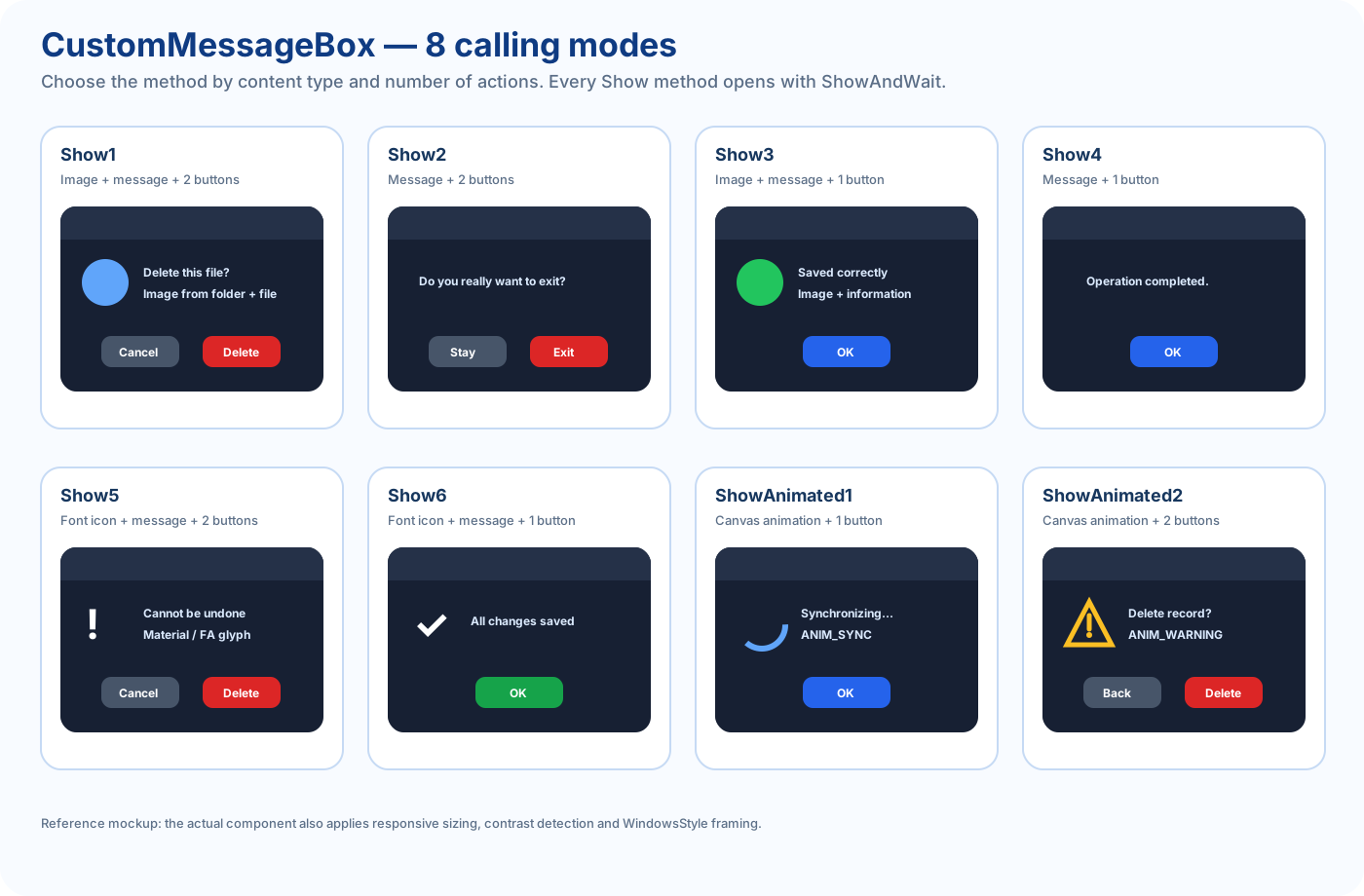
The API is centered around 8 public calling modes:
Show1          image + message + Submit + Cancel
Show2          message + Submit + Cancel
Show3          image + message + Submit
Show4          message + Submit
Show5          font icon + message + Submit + Cancel
Show6          font icon + message + Submit
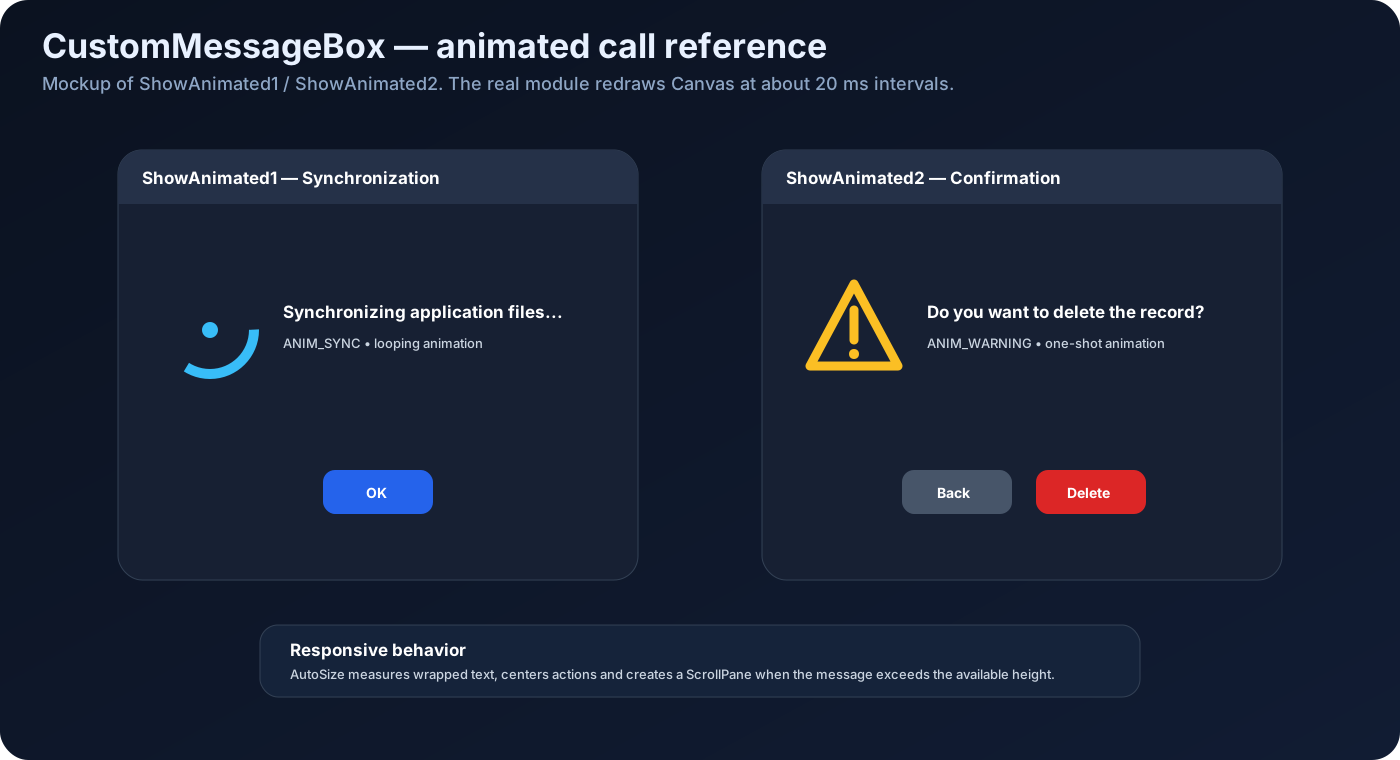
ShowAnimated1  animation + title + message + Submit
ShowAnimated2  animation + title + message + Submit + Cancel
Every mode displays immediately with ShowAndWait.
There is no separate Start call.
Initialize(callback As Object, Eventname As String, parent As Form)
Private Msg As CustomMessageBox
Msg.Initialize(Me, "Msg", MainForm)
Callbacks become EventName_Submit and EventName_Cancel.
The parent Form becomes the Owner.
Recommended pre-show configuration
Msg.title = "Confirmation"
Msg.colorui = fx.Colors.RGB(30, 30, 46)
Msg.colorpanel = fx.Colors.Transparent
Msg.imageicon = xui.LoadBitmap(File.DirAssets, "app.png")
Msg.panel_round = 8

Msg.borders = 5
Msg.AlwaysOnTop = False

Msg.InerShadow = False
Msg.Dropshadow = True
Msg.shadowcolor = fx.Colors.Black
CommonShow automatically recalculates title, close-icon and body-text colors from colorui luminance, so colorui is the recommended way to control light/dark contrast.
Show1 — image + Submit + Cancel
Msg.Show1(File.DirAssets, "trash.png", _
    "Do you want to delete this file?", _
    "Delete", xui.Color_Red, _
    "Cancel", xui.Color_DarkGray, 8)
Show2 — message + Submit + Cancel
Msg.Show2( _
    "Do you really want to exit?", _
    "Exit", xui.Color_Red, _
    "Stay", xui.Color_DarkGray, _
    8)
Show3 — image + Submit
Msg.Show3(File.DirAssets, "info.png", _
    "The configuration was saved correctly.", _
    "OK", xui.Color_Blue, 8)
Show4 — message + Submit
Msg.Show4("Operation completed.", "OK", xui.Color_Blue, 8)
This is the most compact call.
Show5 — font icon + Submit + Cancel
Msg.Show5( _
    Chr(0xE872), _
    xui.CreateMaterialIcons(50), _
    xui.Color_Red, _
    "This action cannot be undone.", _
    "Delete", xui.Color_Red, _
    "Cancel", xui.Color_DarkGray, _
    8)
Show6 — font icon + Submit
Msg.Show6( _
    Chr(0xE86C), _
    xui.CreateMaterialIcons(50), _
    xui.Color_Green, _
    "All changes were saved.", _
    "OK", xui.Color_Green, _
    8)
ShowAnimated1 — animation + Submit
Msg.ShowAnimated1( _
    "Synchronization", _
    "Synchronizing application files...", _
    Msg.ANIM_SYNC, _
    "OK", _
    xui.Color_Blue, _
    8)
The Canvas timer runs at roughly 20 ms intervals with an approximately 1800 ms base animation cycle.
ShowAnimated2 — animation + Submit + Cancel
Msg.ShowAnimated2( _
    "Confirmation", _
    "Do you want to delete the record?", _
    Msg.ANIM_WARNING, _
    "Delete", xui.Color_Red, _
    "Back", xui.Color_DarkGray, _
    8)
Current-source caveat
The current implementation applies colors in reverse when it builds the two buttons:
lblCancel uses submit_color
lblSubmit uses cancel_color
The signature above remains the actual public API, but this note records current behavior so callers are not surprised.
Submit / Cancel events
Private Sub DeleteRecord_Submit
    Log("Confirmed")
End Sub

Private Sub DeleteRecord_Cancel
    Log("Cancelled")
End Sub
The box closes automatically after the callback.
Close button
Current Close_Click logic:
if Cancel callback exists
    call Cancel
else if Submit callback exists
    call Submit
then close
The X button therefore behaves as Cancel when a Cancel callback exists.
Responsive AutoSize
The class measures real text size and automatically adapts the dialog.
minimum              360 × 240
preferred maximum    820 × 650
screen margin         60
Long messages use wrapping and, when needed, an automatically created vertical ScrollPane.
Shadows
Msg.InerShadow = True
Msg.Dropshadow = False
Msg.shadowcolor = fx.Colors.Black
If both are true, InerShadow wins because the source uses If / Else If.
AlwaysOnTop
Default is True.
For a normal application-owned box:
Msg.AlwaysOnTop = False
is commonly preferable.
47 animation constants
ANIM_SUCCESS
ANIM_ERROR
ANIM_WARNING
ANIM_INFO
ANIM_CONFETTI
ANIM_CONFUSED
ANIM_NEUTRAL
ANIM_PACMAN
ANIM_GHOST
ANIM_RAINBOW
ANIM_HEART
ANIM_KIRBY
ANIM_SAD
ANIM_SIGNAL
ANIM_CHART
ANIM_STAR
ANIM_NO_SIGNAL
ANIM_DOWNLOAD
ANIM_LOCK
ANIM_ROCKET
ANIM_SEARCH
ANIM_BELL
ANIM_ANGRY
ANIM_SYNC
ANIM_LOVE_FACE
ANIM_FIRE
ANIM_MAIL
ANIM_MONEY
ANIM_GIFT
ANIM_CAKE
ANIM_BUG
ANIM_CLOUD
ANIM_BATTERY
ANIM_PIN
ANIM_SNOW
ANIM_WINDOWS
ANIM_VIRUS
ANIM_CAT
ANIM_DOG
ANIM_DICE
ANIM_BOX_CAT
ANIM_SUNFLOWER
ANIM_CONFIG
ANIM_FOLDER
ANIM_DONE
ANIM_ELECTRIC_METER
ANIM_BULB
Use constants rather than raw strings.
One-shot vs looping
Current one-shot list:
SUCCESS
ERROR
DONE
STAR
LOCK
INFO
WARNING
NEUTRAL
SAD
CHART
ANGRY
NO_SIGNAL
RAINBOW
MAIL
All remaining animation types loop while the MessageBox is open.
Quick mode selector
| Need | Call |
|---|---|
| image + 2 buttons | Show1 |
| text + 2 buttons | Show2 |
| image + 1 button | Show3 |
| text + 1 button | Show4 |
| font icon + 2 buttons | Show5 |
| font icon + 1 button | Show6 |
| animation + 1 button | ShowAnimated1 |
| animation + 2 buttons | ShowAnimated2 |
Exported public API
Initialize
Show1
Show2
Show3
Show4
Show5
Show6
ShowAnimated1
ShowAnimated2
Close_Click
GetPercentX
GetPercentY
SetSizeByPercentage
Events:
Submit
Cancel
Registered public fields:
borders
InerShadow
Dropshadow
shadowcolor
AlwaysOnTop
The class also declares non-private configuration values such as imageicon, colorpanel, colorui, title and panel_round.
B4X Forum reference
CustomMessageBox was announced with jdashboardUI v23 as the library's modern dialog system with modern styling, animations, custom layouts and improved visual integration.
The current source documented here also includes responsive AutoSize and 47 Canvas animation types.