
Overview
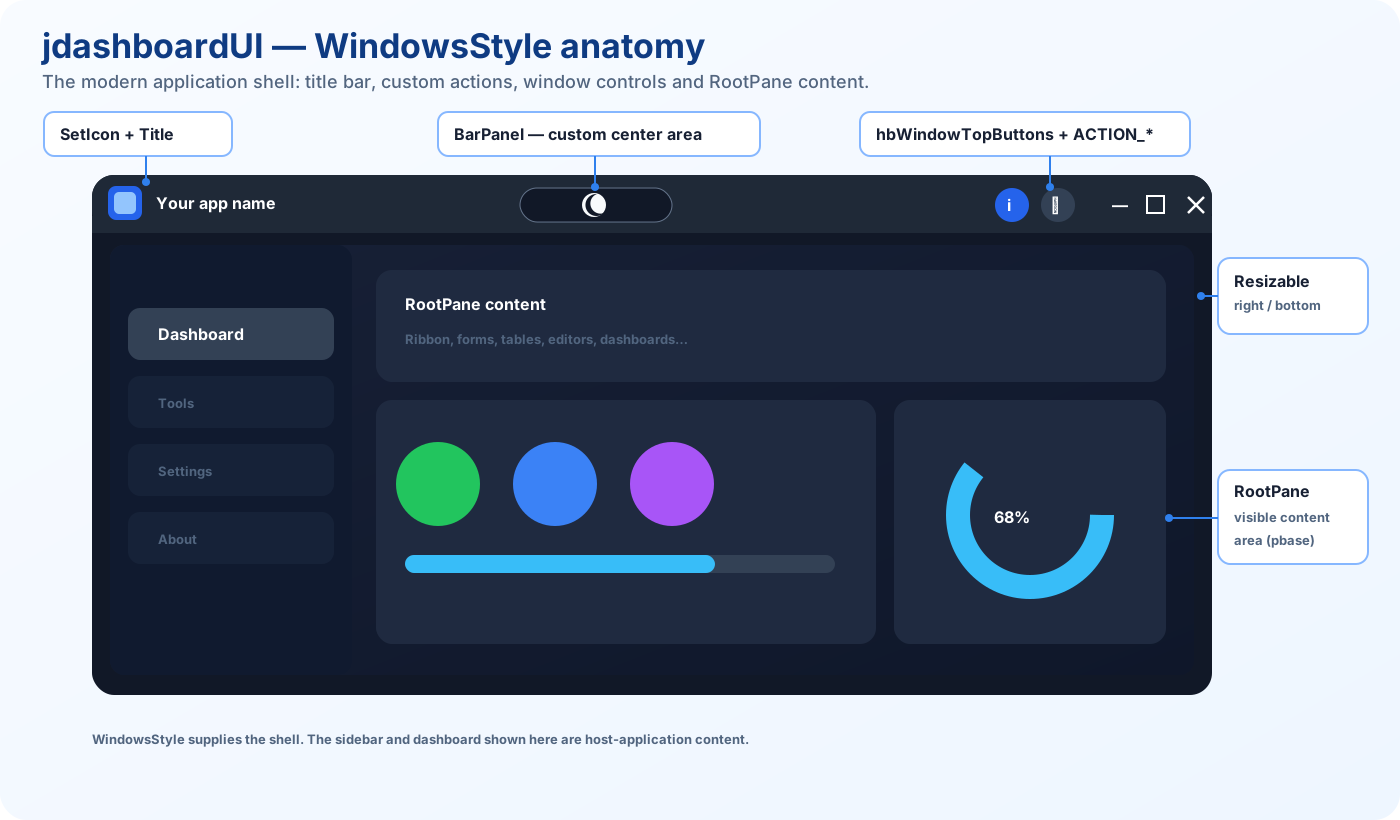
jdashboard_WindowsStyle is the modern window foundation of jdashboardUI for B4J. It turns a normal Form into a custom frameless desktop window and provides the shell where Ribbon, side navigation, dashboards, tables, editors, PDF viewers and other content can be hosted.
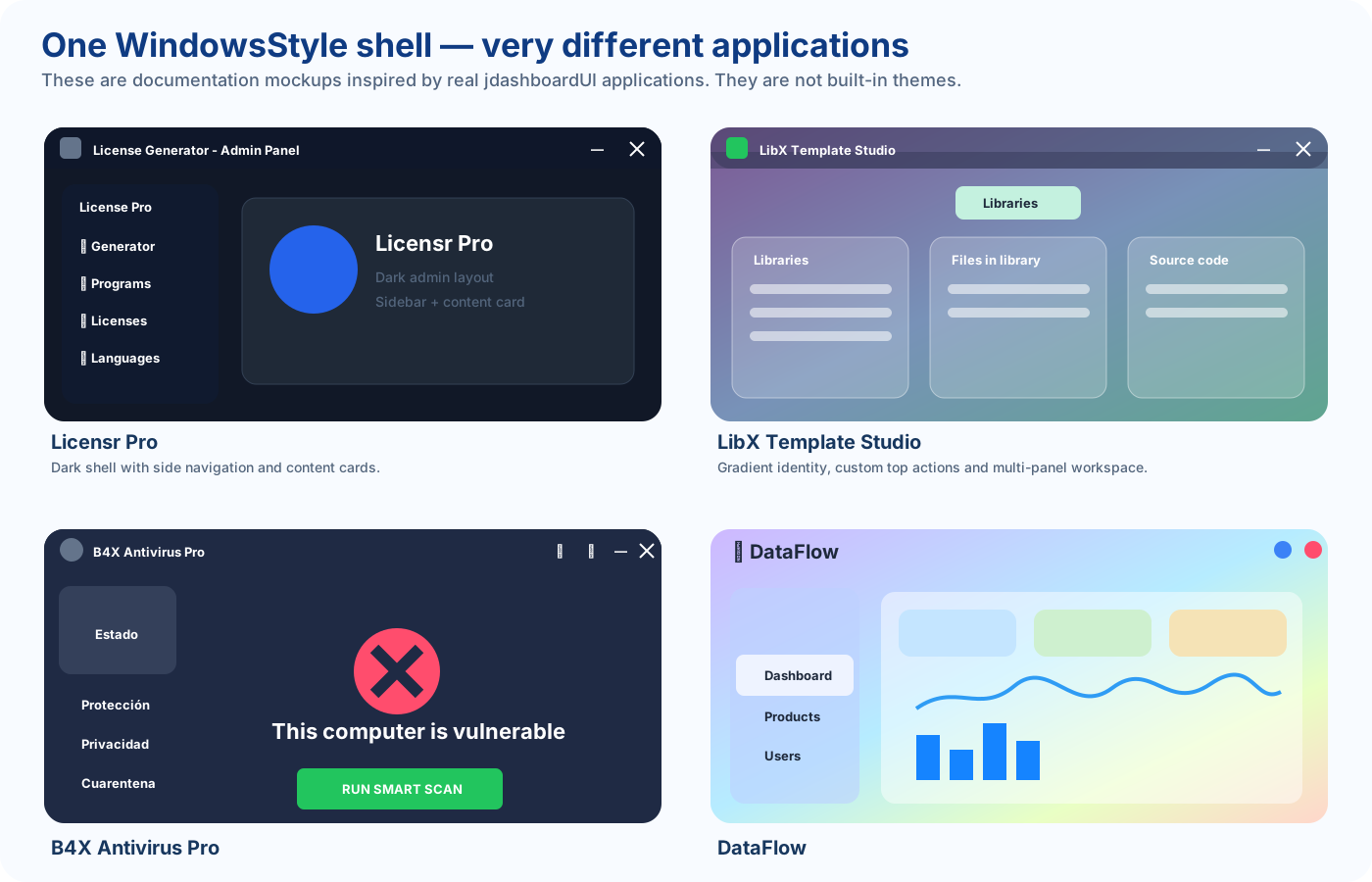
It is not a fixed theme and does not force every application to look the same. Applications such as Licensr Pro, LibX Template Studio, B4X Antivirus Pro and DataFlow can share the same window foundation while using completely different layouts and visual identities.
WindowsStyle manages:
- custom top bar;
- application icon and title;
- minimize, maximize / restore, close and full-screen actions;
- custom icon or image buttons;
- a central BarPanel for custom controls;
- application RootPane;
- window dragging;
- resize borders;
- rounded corners and shadows;
- Always On Top;
- maximize / restore animation;
- min/max size limits;
- screen-percentage sizing;
- multi-monitor adaptation;
- reserved space for side navigation through MenuType.
The actual implementation uses a transparent Form, loads jCustomWindow.fxml internally and adds fluent-light.css.
Role inside jdashboardUI
WindowsStyle is best understood as the application shell.
jdashboard_WindowsStyle
        ↓
window + top bar + actions + RootPane
        ↓
your visual design
        ↓
Ribbon / side menu / tables / charts / editors / forms
WindowsStyle controls the window while the application controls the content and branding.
Window anatomy
Transparent Form
├── apWindowTop
│   ├── application icon
│   ├── Title
│   ├── BarPanel
│   └── hbWindowTopButtons
├── apWindowLeft
├── apWindowRight
├── apWindowBottom
└── RootPane / pbase
    └── application content
The public RootPane returns pbase, the prepared application-content area, not the native Form RootPane.
ui.RootPane.LoadLayout("Main")
Initialization
Actual signature:
Initialize( _
    moduleParent As Object, _
    parentForm As Form, _
    eventName As String, _
    color As Paint)
Basic example:
ui.Initialize(Me, MainForm, "ui", fx.Colors.RGB(30, 30, 46))

ui.Title.Text = "My Application"
ui.Title.TextColor = fx.Colors.White

ui.AddIconButton("close", Chr(0xE14C), fx.Colors.White, _
    fx.CreateMaterialIcons(22), ui.ACTION_EXIT, "Close")

ui.AddIconButton("maximize", Chr(0xE3E0), fx.Colors.White, _
    fx.CreateMaterialIcons(22), ui.ACTION_MAXIMIZE, "Maximize")

ui.AddIconButton("minimize", Chr(0xE15B), fx.Colors.White, _
    fx.CreateMaterialIcons(22), ui.ACTION_MINIMIZE, "Minimize")

ui.RootPane.LoadLayout("Main")
MainForm.Show
Initialize switches the Form to TRANSPARENT style, makes the JavaFX scene transparent, removes the native border, loads jCustomWindow.fxml, prepares pbase, centers the window, configures resizing, creates the maximize animation timer, registers Stage X/Y listeners, creates BarPanel, applies the current Always On Top state and loads fluent-light.css.
Title and icon
Title returns the real title Label:
ui.Title.Text = "Licensr Pro"
ui.Title.TextColor = fx.Colors.White
ui.Title.Font = xui.CreateDefaultBoldFont(12)
Style the title:
ui.titlestyle(xui.Color_RGB(67, 67, 77))
Set the application icon:
ui.SetIcon(fx.LoadImage(File.DirAssets, "app.png"))
SetIcon updates both the custom title-bar image and Form.Icon.
Top-bar buttons
AddIconButton
ui.AddIconButton("settings", Chr(0xE8B8), fx.Colors.White, _
    fx.CreateMaterialIcons(22), ui.ACTION_NONE, "Settings")
AddImageButton
ui.AddImageButton("profile", File.DirAssets, "user.png", _
    ui.ACTION_NONE, "Profile")
The implementation adds every new button at index 0. Adding close, maximize and minimize in that order normally produces:
minimize | maximize | close
Get a button later with:
Dim Btn As Button = ui.GetButton("settings")
Built-in actions
| Constant | Value | Action |
|---|---|---|
| ACTION_NONE | -1 | No built-in window action |
| ACTION_EXIT | 2 | Exits the application |
| ACTION_MAXIMIZE | 4 | Maximize / restore |
| ACTION_MINIMIZE | 8 | Minimize |
| ACTION_FULLSCREEN | 16 | Enter full screen |
ACTION_EXIT raises Exiting and then calls ExitApplication. For a secondary Form, prefer ACTION_NONE and close the Form from your own callback.
Events
With EventName ui:
Private Sub ui_Maximizing
End Sub

Private Sub ui_Maximized
End Sub

Private Sub ui_Minimizing
End Sub

Private Sub ui_Minimized
End Sub

Private Sub ui_EnteringFullScreen
End Sub

Private Sub ui_FullScreen
End Sub

Private Sub ui_Exiting
End Sub

Private Sub ui_MouseClicked(ButtonSender As Button, EventData As MouseEvent)
End Sub

Private Sub ui_MouseEntered(ButtonSender As Button, EventData As MouseEvent)
End Sub

Private Sub ui_MouseExited(ButtonSender As Button, EventData As MouseEvent)
End Sub
Each dynamic button can also use EventName_Click.
BarPanel
Dim TopArea As B4XView = ui.panelbar
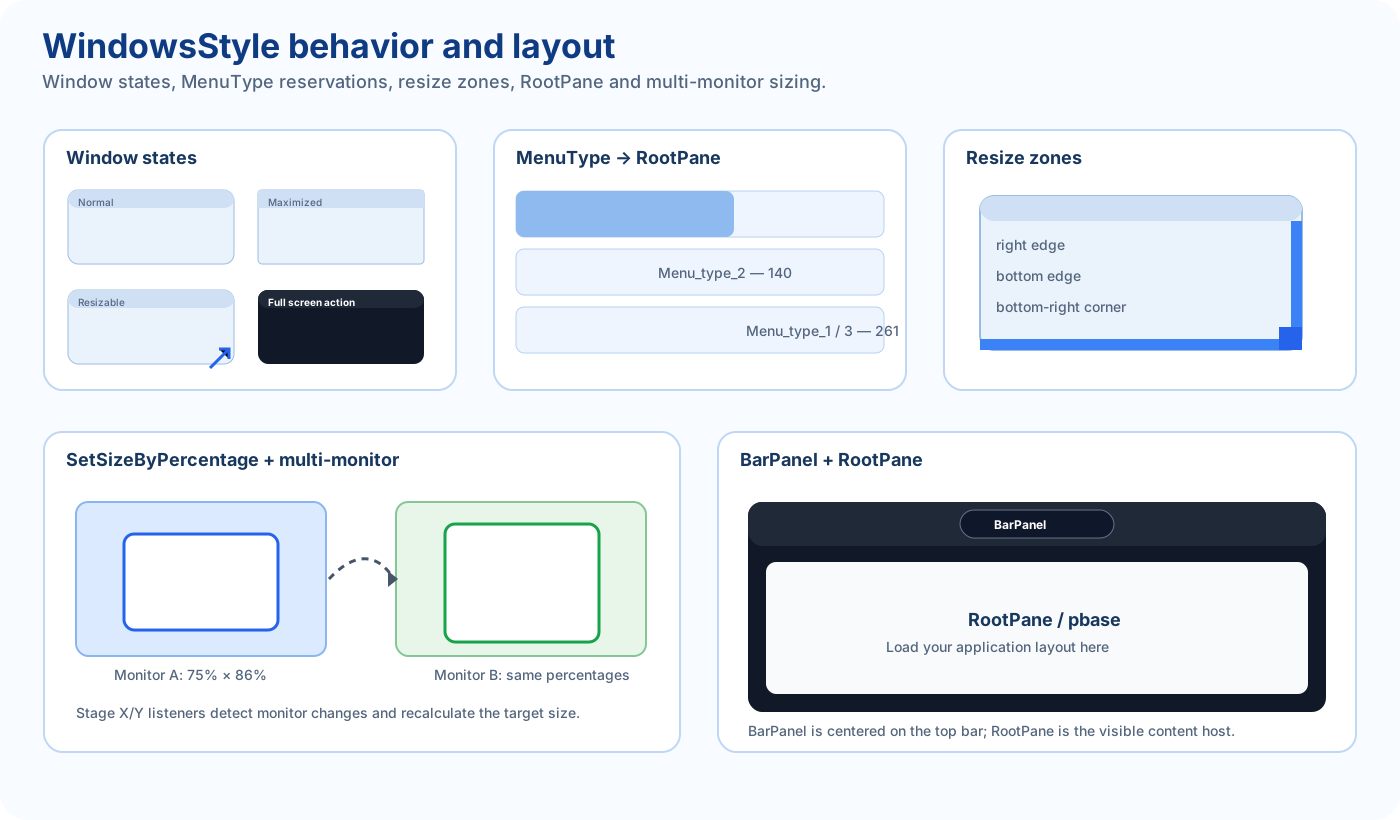
BarPanel is centered on the top bar, has a base height of 45 and is recalculated to roughly one third of the window width.
It can host custom controls such as a light/dark switch, status indicator, search box or quick action.
TopArea.AddView(MySwitch, 0, 0, 100dip, 35dip)
Allow dragging from BarPanel:
ui.PanelBarAllowDragging = True
Resizing and limits
ui.Resizable = True
ui.SetWindowSizeLimits(700, 500, 1800, 1200)
Current resize handling mainly uses the right edge, bottom edge and bottom-right corner. Manual resize is blocked while maximized.
Border settings:
ui.BorderWidth = 7
ui.BorderRadius(10)
Shadows and colors
ui.ColorUI = fx.Colors.RGB(30, 30, 46)
ui.Dropshadow = fx.Colors.Black
ui.Inershadow = fx.Colors.Gray
Dropshadow also reduces pbase with an inner gap so the external shadow and rounded corners remain visible.
The public property name is currently spelled Inershadow.
Always On Top
ui.AlwaysOnTop = False
The current internal default is True and Initialize applies it to the Stage. Set it explicitly to False for normal desktop windows.
Animations
ui.AnimationsActivated = True
ui.AnimationSpeedMultiplier = 5
The class uses a Timer to interpolate window X, Y, width, height and border geometry while maximizing / restoring.
RegisterOnMaximizeComplete
ui.RegisterOnMaximizeComplete(Me)

Public Sub OnMaximizeComplete
    Log("Maximize finished")
End Sub
This callback is useful when a menu, editor or data view must recalculate after the maximize animation physically ends.
Full screen
ui.AddIconButton("fullscreen", Chr(0xE5D0), fx.Colors.White, _
    fx.CreateMaterialIcons(22), ui.ACTION_FULLSCREEN, "Full screen")
Flow:
ui_EnteringFullScreen
→ Stage.setFullScreen(True)
→ ui_FullScreen
MenuType
WindowsStyle can reserve horizontal space for optional side navigation.
| Constant | Value | Reserved width |
|---|---|---|
| No_menu | 0 | 0 |
| Menu_type_1 | 1 | 261 |
| Menu_type_2 | 2 | 140 |
| Menu_type_3 | 3 | 261 |
ui.MenuType = ui.Menu_type_1
JWindowsMenuStyle uses this mechanism to keep side navigation and content aligned.
Percentage sizing and multi-monitor support
ui.SetSizeByPercentage(75, 86)
This uses 75% of the detected screen width and 86% of its height, then centers the window.
The class registers Stage X/Y listeners. When a percentage-sized window moves to another monitor, it recalculates the same percentage on the new screen.
Use:
ui.GetPercentX(50)
ui.GetPercentY(25)

ui.GetRootPanelPercentX(80)
ui.GetRootPanelPercentY(50)
The first pair uses full target Form dimensions. The RootPanel pair uses the real visible content area.
Focus and cleanup
If ui.Focused Then
    Log("A view has focus")
End If

ui.Dispose
Focused recursively checks JavaFX views for isFocused.
Dispose releases the Timer, Stage listeners, stylesheets, RootPane nodes, button maps and maximize callbacks.
TopBarStyle and BorderStyle note
The public API exposes TopBarStyle and BorderStyle. In the current source the backing strings are declared and returned but are not assigned elsewhere in the class, so these getters can currently return an empty string.
What WindowsStyle does not create automatically
WindowsStyle does not create a Ribbon, side menu, dashboard, tables, charts or a fixed application theme.
It creates the modern window foundation that those components use.
That is why the same WindowsStyle shell can support a dark licensing tool, a gradient library manager, a security application or a light business dashboard.
Real applications built on WindowsStyle
The supplied references show four very different uses of the same foundation:
Licensr Pro
A dark frameless window with a minimal top bar, custom title and side navigation. WindowsStyle supplies the shell and content host while the sidebar and cards belong to the application design.
LibX Template Studio
A gradient visual identity with several work panels and top actions. The gradient and panels are not a built-in WindowsStyle theme; they are custom content hosted inside RootPane.
B4X Antivirus Pro
A dark security interface with side navigation, extra top actions and a clean central workspace. Notification or menu buttons can coexist with the system actions through AddIconButton / AddImageButton or custom controls.
DataFlow
Shows that WindowsStyle also supports light layouts, gradients, dashboards, charts and customized window actions. The class does not force a dark appearance or one fixed title-bar design.
The key point is: WindowsStyle defines the modern window structure, not the complete visual identity of the application.
Public API
Methods
| API | Purpose |
|---|---|
| Initialize | Initialize WindowsStyle |
| Dispose | Release resources |
| BorderRadius | Set corner radius |
| panelbar | Return BarPanel |
| AddIconButton | Add top icon button |
| AddImageButton | Add top image button |
| GetButton | Get button by EventName |
| Focused | Find a focused child view |
| SetIcon | Set window icon |
| RegisterOnMaximizeComplete | Register animation-complete callback |
| Title | Return title Label |
| titlestyle | Style title Label |
| SetWindowSizeLimits | Set min/max dimensions |
| AdjustBarPanel | Recalculate BarPanel |
| AdjustRootPanel | Recalculate content area |
| SetSizeByPercentage | Size relative to screen |
| GetRootPanelPercentX | Percent of visible content width |
| GetRootPanelPercentY | Percent of visible content height |
| GetPercentX | Percent of target Form width |
| GetPercentY | Percent of target Form height |
Properties
| Property | Purpose |
|---|---|
| AlwaysOnTop | Keep Stage above other windows |
| ColorUI | Outer background |
| PanelBarAllowDragging | Drag from BarPanel |
| Dropshadow | Outer shadow |
| Inershadow | Inner shadow |
| Resizable | Enable manual resize |
| TopBarStyle | Current style getter |
| BorderStyle | Current style getter |
| BorderWidth | Window border size |
| AnimationSpeedMultiplier | Animation speed |
| AnimationsActivated | Enable animation |
| RootPane | Application content area |
| MenuType | Side-menu reservation |
Public fields
ACTION_EXIT
ACTION_MAXIMIZE
ACTION_MINIMIZE
ACTION_FULLSCREEN
ACTION_NONE

Menu_type_1
Menu_type_2
Menu_type_3
No_menu

hbWindowTopButtons
TargetWidth
TargetHeight
Recommended pattern
ui.Initialize(Me, MainForm, "ui", fx.Colors.RGB(30, 30, 46))
ui.SetSizeByPercentage(75, 86)
ui.SetWindowSizeLimits(700, 500, 1800, 1200)

ui.Title.Text = "My Application"
ui.Title.TextColor = fx.Colors.White
ui.SetIcon(fx.LoadImage(File.DirAssets, "app.png"))
ui.titlestyle(xui.Color_RGB(67, 67, 77))

ui.BorderRadius(10)
ui.BorderWidth = 7
ui.Resizable = True
ui.AnimationsActivated = True
ui.AlwaysOnTop = False
ui.MenuType = ui.No_menu

ui.AddIconButton("close", Chr(0xE14C), fx.Colors.White, _
    fx.CreateMaterialIcons(22), ui.ACTION_EXIT, "Close")

ui.AddIconButton("maximize", Chr(0xE3E0), fx.Colors.White, _
    fx.CreateMaterialIcons(22), ui.ACTION_MAXIMIZE, "Maximize")

ui.AddIconButton("minimize", Chr(0xE15B), fx.Colors.White, _
    fx.CreateMaterialIcons(22), ui.ACTION_MINIMIZE, "Minimize")

ui.RootPane.LoadLayout("Main")
MainForm.Show