
What JColorPicker is
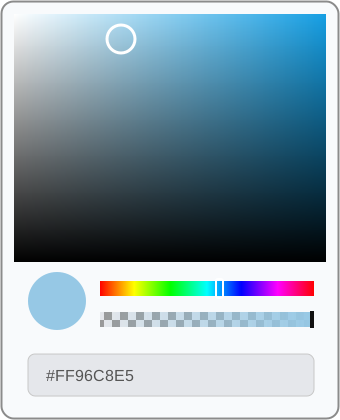
JColorPicker is the advanced jdashboardUI color selector for B4J.
Unlike OfficeColorPicker, which uses a discrete Office-style palette, JColorPicker provides continuous color selection through:
- saturation / brightness area;
- Hue bar;
- Alpha bar;
- circular selected-color preview;
- editable hexadecimal input;
ColorChangedevent;- normal or floating mode.
Current source note: the class contains
#ExcludeFromLibrary: true. This documentation reflects the real source implementation; direct availability from a compiled distribution depends on how that build is packaged.
Control structure
JColorPicker
├── Saturation / brightness
├── Hue
├── Alpha
├── Selected color
└── Hexadecimal input
Changing any selector recalculates the color and raises:
ColorChanged(Clr As Int)
Dependencies
The real source mainly uses:
XUI;JFX;B4XView;B4XCanvas;BitmapCreator;jdashboardUtils.
BitmapCreator renders the color, Hue and Alpha surfaces. jdashboardUtils is used for the hexadecimal field and visual helpers.
Designer usage
Add JColorPicker as a Custom View in the Designer.
Private Sub JColorPicker1_ColorChanged(Clr As Int)
    pnlPreview.Color = Clr
    Log(Clr)
End Sub
Read the selected color
SelectedColor is exposed for reading:
Dim Clr As Int = JColorPicker1.SelectedColor
It returns the ARGB color built from Hue, Saturation, Value and Alpha.
Set a color from code
Use SelectedColor2 for read/write access:
JColorPicker1.SelectedColor2 = 0xFF5B9BD5
Dim Clr As Int = JColorPicker1.SelectedColor2
Setting it converts the ARGB color to HSV and updates Hue, Alpha, the selection marker, preview and hexadecimal field.
HSV + Alpha
SelectedHSVColor contains:
H, S, V, Alpha
Example:
Dim HSV() As Object = Array(200, 0.55, 0.90, 255)
JColorPicker1.SelectedHSVColor = HSV
Read it:
Dim HSV() As Object = JColorPicker1.SelectedHSVColor
Convert a color to HSV
Dim HSV() As Object = JColorPicker1.ColorToHSV(0xFF5B9BD5)
The result is an array containing H, S, V, Alpha.
Hexadecimal input
The bottom field accepts:
#RRGGBB
#AARRGGBB
For example:
#96C8E5
#FF96C8E5
A valid value updates HSV and raises ColorChanged.
When the user changes the color from the UI, the hexadecimal field is updated automatically.
Alpha / transparency
The Alpha bar works from:
0   = fully transparent
255 = fully opaque
A checkerboard background makes transparency visible.
Floating mode
Enable it in the Designer with:
Floating Mode = True
Floating mode creates a container with:
- Color Picker title;
- rounded border;
- close button;
- picker below the title bar.
It can also be enabled from code:
JColorPicker1.Floating = True
Read it:
Log(JColorPicker1.Floating)
Show and hide
Especially useful with floating mode:
JColorPicker1.SetVisible(True)
JColorPicker1.SetVisible(False)
The floating close button hides mBase.
Create JColorPicker from code
JColorPicker includes AddToParent.
The public signature is:
AddToParent(Parent As B4XView, _
    l As Int, _
    t As Int, _
    w As Int, _
    h As Int, _
    Colorborder As Int, _
    InitialColor As Int)
Example:
Private Picker As JColorPicker

Private Sub CreateColorPicker
    Picker.Initialize(Me, "Picker")
    Picker.Floating = False

    Picker.AddToParent( _
        pnlColors, _
        0, _
        0, _
        290dip, _
        360dip, _
        xui.Color_LightGray, _
        0xFF96C8E5)
End Sub

Private Sub Picker_ColorChanged(Clr As Int)
    pnlPreview.Color = Clr
End Sub
Floating example
Private FloatingPicker As JColorPicker

Private Sub CreateFloatingPicker
    FloatingPicker.Initialize(Me, "FloatingPicker")
    FloatingPicker.Floating = True

    FloatingPicker.AddToParent( _
        MainForm.RootPane, _
        40dip, _
        40dip, _
        290dip, _
        390dip, _
        xui.Color_LightGray, _
        xui.Color_Blue)

    FloatingPicker.SetVisible(False)
End Sub

Private Sub btnColor_Click
    FloatingPicker.SetVisible(True)
End Sub

Private Sub FloatingPicker_ColorChanged(Clr As Int)
    btnColor.Color = Clr
End Sub
Runtime appearance
BordersColor
JColorPicker1.BordersColor = xui.Color_Gray
BackgroundColor
JColorPicker1.BackgroundColor = xui.Color_White
TextColor
JColorPicker1.TextColor = xui.Color_DarkGray
Designer properties
| Property | Default | Purpose |
|---|---|---|
BorderColor |
0xFFFFFFFF |
Border color |
PanelBackgroundColor |
0xFFFFFFFF |
Component background |
TextAreaTextColor |
0xFF000000 |
Hex input text color |
FloatingMode |
False |
Enables floating container |
ColorChanged event
Private Sub JColorPicker1_ColorChanged(Clr As Int)
    Log("ARGB: " & Clr)
End Sub
It is raised when the color changes from the main surface, Hue, Alpha or a valid hexadecimal value.
Public API
| Method / property | Purpose |
|---|---|
Initialize(Callback, EventName) |
Initializes the picker |
DesignerCreateView(...) |
Designer integration |
AddToParent(...) |
Creates it from code |
SetVisible(Boolean) |
Shows / hides it |
SelectedColor |
Current color, read |
SelectedColor2 |
Current color, read / write |
SelectedHSVColor |
H, S, V and Alpha |
ColorToHSV(Clr) |
Converts ARGB to HSV + Alpha |
BordersColor |
Border color |
BackgroundColor |
Background |
TextColor |
Hex text color |
Floating |
Gets / sets floating mode |
mBase |
Base view |
JColorPicker vs OfficeColorPicker
| Feature | JColorPicker | OfficeColorPicker |
|---|---|---|
| Picker type | Continuous | Discrete palette |
| Saturation / brightness | Yes | No |
| Hue | Yes | No |
| Alpha | Yes | No |
| Hexadecimal | Editable | No |
| Office palette | No | Yes |
| Theme colors | Free selection | Yes |
| Floating mode | Yes | No |
| AddToParent | Yes | Yes |
| Best for | Any arbitrary color | Fast consistent selection |
A useful pattern is to use OfficeColorPicker for quick choices and open JColorPicker from More Colors....